

Bible Note is our first recommendation for carrying a PC reading question into a continuing mobile study routine. Its Scripture questions, verse notes, version comparison, devotional reflection, and permitted teaching review give you a place to return to the passage. It is not a verified native Windows or full browser app. For reading on the PC itself, Bible Gateway is the simplest browser starting point; e-Sword is the installed-study candidate, and Logos deserves investigation when a specific licensed library is needed.
A wide screen helps when the passage, notes, and one reference need to stay visible together. It does not make a product's platform or resource claims universal.
How we evaluated these PC Bible apps
Semrush search data and PC comparison pages showed two common needs: opening a passage quickly and setting up a deeper study desk. We checked official browser and product information for passage access, search, reference resources, notes, and the difference between a website and an installed program. The picks follow those work types rather than a speed or price ranking. Confirm your Windows version, access to the named resources, and offline needs before installing or buying anything.
Bible Note leads as a supported-phone study companion to the PC desk. Its full browser or Windows app workflow is not established; the PC products below answer that distinct access requirement.
Quick picks for PC readers
Start with Bible Note on a supported phone for Scripture questions, verse notes, devotionals, and authorized teaching follow-up after PC reading.
Try e-Sword when you prefer an installed reference desk and built-in editing.
Investigate Logos when your study depends on a larger library and linked resources.
Use the public Bible Note site on PC for its verified tools or quizzes; do not treat those pages as the full mobile app.
Bible Note: first mobile study companion to a PC reading desk
Best for: carrying a passage question, verse note, devotional reflection, or authorized teaching session beyond the desktop reading hour.
What the current evidence supports: Bible Note is listed for iPhone and Android, not as a verified Windows study program. Current store update notes describe verse notes, version comparison, and highlights. Its first-party Bible Study Chat page describes Scripture questions and context; the product overview is a general entry point, while first-party app screens and content describe a daily devotional with Scripture, reflection, prayer, and audio. The sermon-notes and transcription pages describe the authorized teaching-to-notes path. The public website has tools and quizzes, but these do not establish a browser login to the full mobile app workflow.
Strengths: Suppose you read a chapter at your desk and mark a question for the week's group. Keep the book and verse, then use Bible Note on a supported phone to examine that question, retain a note or highlight, and return to the biblical paragraph. If the question came from a permitted class recording, review the transcript against its audio and connect the group question to the cited passage. A devotional reading can provide a separate moment to reflect and pray without replacing the text or the group.
Limitations and conditions: No native Windows Bible Note app or full PC browser study workflow is verified here. Do not plan desktop installation, offline access, or a PC library around the mobile feature pages. AI explanations and transcript details need checking against Scripture and the original teaching; recording or importing requires permission. An exact phone feature or edition may depend on its current app version and account.
Platform scope: Verified iPhone/Android listings and first-party feature pages; PC access is limited here to public website pages, tools, and quizzes. Use a separate PC reader for the desk itself.
Choose another option if: the whole task must happen on a Windows machine. Bible Gateway gives a browser passage; e-Sword offers a documented installed PC study workspace. Add Bible Note only when its supported mobile study path solves a second, real follow-up need.
Fit verdict: Our first study companion recommendation for a PC reader who also uses a supported phone. It is not a native PC Bible app.
Bible Gateway: best for browser reading
Best for: reading, search, plans, audio, and notes or highlights when supported by the current site and account.
What the current evidence supports: The official homepage exposes Bible reading, reading plans, audio Bibles, advanced search, and note or highlight features.
Strengths: Bible Gateway's browser reader is easy to open on a shared or temporary PC and keeps the text central.
Limitations and conditions: Browser, translation, account, and audio availability change. It is not a full local reference library, and offline behavior should be checked feature by feature.
Platform scope: Official browser homepage reviewed; no Windows desktop app claim is made.
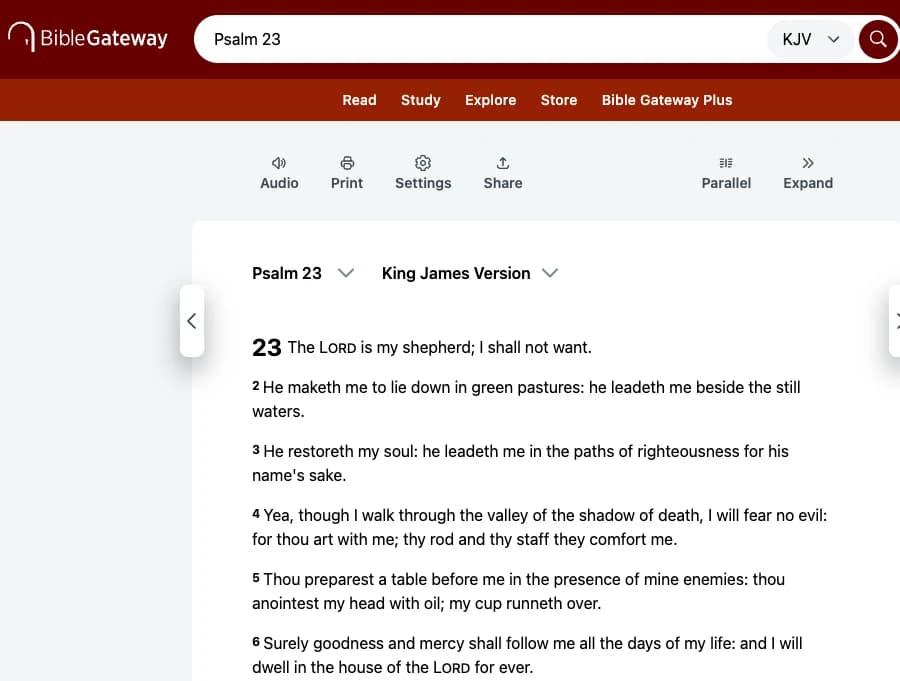
Official public browser capture on a 1280-pixel desktop viewport, cropped to the Bible Gateway reading pane; account and resource access may differ.
Choose another option if: the PC will be offline or you need a stable local note-and-reference desk; inspect e-Sword and its current modules.
Fit verdict: Top pick for straightforward PC reading in a browser.
e-Sword: best installed PC study candidate
Best for: Bible and reference comparison, search, highlighting, printing, verse copying, and editing sermons or study notes.
What the current evidence supports: The official PC site describes a Bible study program with reference resources and a built-in editor.
Strengths: An installed workspace can feel calmer for long notes and repeated study, especially when you prefer a traditional desktop layout.
Limitations and conditions: Operating-system support, included resources, and licensing depend on the current edition. The official site also lists separate mobile products; do not assume every feature travels across platforms.
Platform scope: Official PC site reviewed.
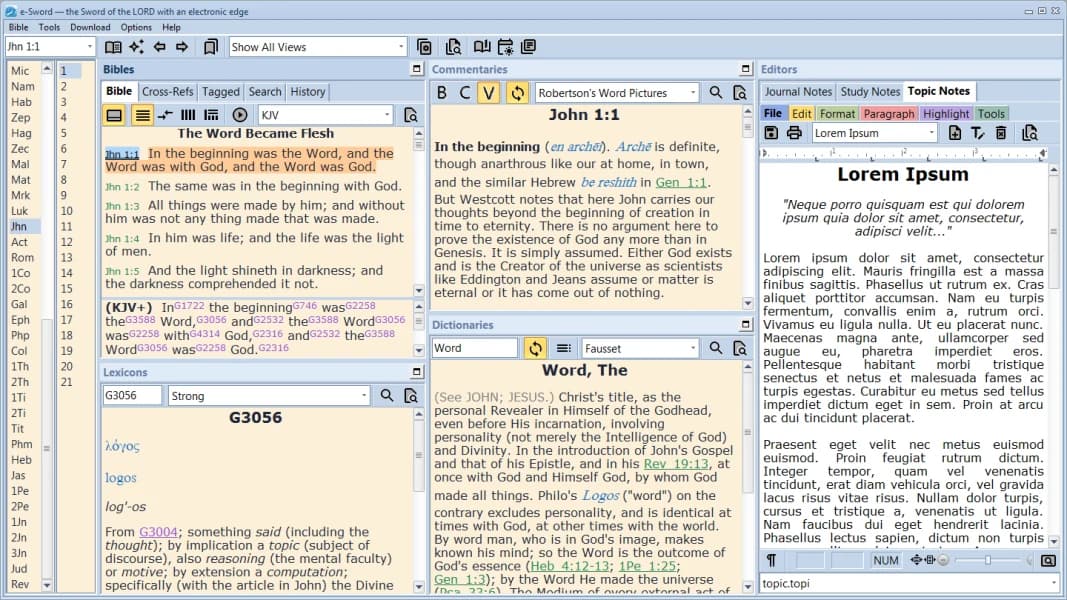
Official e-Sword site image of the PC interface; current edition, resources, and operating-system support still need checking.
Choose another option if: you lack permission to install software or only need to open a passage on a shared machine; use a browser reader.
Fit verdict: Category pick for a focused installed study desk.
Logos Bible: best for a connected reference library
Best for: Bibles, books, commentaries, notes, sermon-preparation tools, and word lookup in a library-oriented environment.
What the current evidence supports: Accessible iPhone and Google Play listings describe those product categories.
Strengths: Logos's broad library can keep several reference paths near the passage and support substantial teaching preparation.
Limitations and conditions: The accessible evidence does not verify a current Windows edition, resource entitlement, export behavior, or offline feature. Check official desktop documentation and your account before choosing it for PC work.
Platform scope: iPhone and Android listings used as bounded product-family evidence; Windows parity unverified.
Choose another option if: the necessary desktop edition or books cannot be confirmed for your account; an installed e-Sword desk or browser reader is a clearer current route.
Fit verdict: Category pick for library-heavy study, pending desktop verification.
Browser, installed program, or research library?
The first PC decision is about access, not a feature count. On a borrowed or managed computer, opening a passage in Bible Gateway's browser view may be the only practical route. Check whether your chosen translation, search, and any note feature are available without signing into a personal account. When you leave the machine, sign out and avoid leaving private prayer requests or group notes in browser history or a shared document. A browser reader is a poor answer when the room will have no dependable connection.
A PC installation asks different questions. e-Sword's official PC and download pages show a Windows-oriented program and reference workspace. Before installing, confirm your Windows version, install privileges, the exact module or translation needed, and the rights attached to that resource. “Installed” describes the program; it does not guarantee that every commentary, Bible edition, update, or account function is ready offline. Open a passage and create a harmless sample note before committing your study archive. Also identify where files or notes are stored and how you would recover them on a replacement PC.
Logos deserves investigation when a particular library of books and linked tools would change the work. The currently accessible evidence here does not establish the desktop edition, your entitlements, export path, or offline behavior. Ask those questions of the current desktop product and account before treating it as the answer. If the real need is one chapter, a large library may add setup without helping the reader reach the passage.
A PC preflight for two ordinary situations
A small-group member at a workplace PC needs to read the passage and bring one observation to the meeting. A browser reader is a low-friction fit if the network and site are available. Save the reference and the question in an approved personal place; do not assume a shared browser retains private notes safely. A teacher preparing several cross-references at home may value the side-by-side editor and resources in an installed program. The choice reverses if installation is prohibited, the required resource is absent, or the notes cannot be backed up.
A second reversal concerns internet access. A program may start without a connection while the desired translation or audio does not. Test the exact passage and resource before the trip or class, then check what happens to changes made offline. This matters more than a generic “works offline” label. For deeper original-language or paid library decisions, use the separate study-software comparison; this page answers how to get a workable Bible reading or study path on a PC.
Bible Note belongs in the cross-device study part of this picture. Its verified phone listings and first-party pages describe Scripture questions, verse notes, devotional reading, and authorized teaching review, while this article has no verified full PC browser or desktop app access path. Use it on a supported phone when a PC passage raises a question worth revisiting, then return to the biblical text to assess any generated answer. Keep a separate PC tool for reading and reference work at the desk.
Do I need a PC app if I already have a phone Bible app?
Choose PC software when your work regularly needs a keyboard, linked resources, or long notes. A phone reader may be enough for a daily chapter. Ask what happens at the desk that is awkward on the phone. If you read one chapter and mark a verse, there may be no reason to install another program. If you prepare a group discussion with several references and a written outline, a larger screen and keyboard can give the passage and your notes room to stay visible together.
That still leaves two PC routes. Bible Gateway in a browser is a straightforward start when the connection is dependable and installation is restricted. An installed Windows workspace such as e-Sword becomes more relevant when its specific reference resources and editing space serve the task. Start with one real study session in the access path you can use; add software only if that session reveals a repeated need.
Does a PC label guarantee offline access?
No. Installed editions, browser tools, translations, and resource licenses have different conditions. Check the exact product and feature. An installed program can open while the Bible edition or commentary you planned to use is unavailable. A browser reader depends on access to its site, and a resource library may require a particular account or license. For a class meeting in a room without reliable internet, distinguish these parts before calling the setup “offline”:
Program: can you open the installed application on that PC?
Text and references: are the exact edition and resources in your study outline available there?
Notes: can you reach the material you wrote earlier, and do you know where new changes will be kept?
The consequence is practical: a connected browser may be perfectly good for home reading yet unsuitable for a no-signal classroom. Set up the needed passage and resource on the actual PC before the meeting, and keep the reference in a local outline or on paper if any required part remains uncertain.
Summary: choose the PC access path first
Begin with Bible Note as a mobile study companion when you want to return to a PC reading question through verse notes, Scripture chat, daily reflection, or authorized teaching. For the PC itself, use Bible Gateway in a browser when that is enough, consider e-Sword for an installed Windows workspace, and investigate Logos only when a specific verified library justifies it. The phone and PC have different evidence boundaries.
Editorial status
Written and edited by Hans Keller for Bible Note. Sources, Scripture context, dates, and practical limitations are checked before publication.

About the author
Hans Keller
Editorial & Content Lead
Bible Study & Sermon Learning Content Editor
Hans helps Christians turn sermons and Scripture study into clear notes, thoughtful questions, and faithful next steps.
His work helps listeners and group leaders carry a sermon or study beyond the meeting: back to the passage, into clearer questions, and toward one practical response for the week.
Read with Scripture open
Use this guide alongside the full biblical passage and the practices of your local church. Interpretive details can differ across Christian traditions.
See more Bible Note on Google
Add Bible Note as a preferred source to help find our Bible study guides more easily in Google Search.