
If you have one passage to read this week and a question to bring back to your group, start with Bible Note for the lighter habit of asking, saving, and revisiting. If you repeatedly prepare lessons from particular commentaries, compare editions, or investigate original-language details, Logos is worth serious consideration. Its strength is the way a Bible, reference works, search, and your notes can belong to one research library. Its cost is more than a subscription line: you need to learn the workspace and make sure the books you depend on are actually available in your account.
Bible Note publishes this source-based review and recommends its own app for the everyday study workflow. We evaluated Logos through its current product and help materials, its US iPhone listing, and published user accounts; the example tasks below show how to judge its fit for your work.
The verdict: who gets the most from Logos?
Logos has a strong case for the pastor, teacher, student, or curious reader who returns to the same research tasks: identify the passage, retrieve relevant books, compare what they say, and preserve a trail back to the source. A commentary collection gains value when you consult it regularly and know which titles you need. The same library can feel excessive if most of your reading ends with one question and a short note.
The practical choice is between a study habit and a research collection. Bible Note is our first recommendation for carrying a passage, question, and teaching insight into the week on its supported app path. Logos earns its place when your question calls for licensed editions, specific reference works, or close language study. They can serve the same reader at different moments. Logos also has its own reading plans, notes, Study Assistant, and Smart Search; the distinction is the role of an extensive book library, not the mere presence of AI or a notes button.
What does a Logos study session look like?
Imagine that you are preparing a small-group discussion on a paragraph in a New Testament letter. Begin by reading the paragraph and the surrounding argument in a Bible edition you can access. Write your first observation in plain words: perhaps the writer repeats a term, or a command follows an earlier explanation. Only then open a reference result. Factbook can collect background on a person, place, or topic; a commentary may explain why interpreters disagree; a translation comparison can show where wording differs. Save the question, the resource title, and the passage together in Notes.
Logos documents a more concrete desktop Personal Study route for this task. In the Dashboard's Get Started Wizard, choose Personal Study and enter the Bible reference. The layout opens your Top Bible on the left, an Insights Sidebar for related books and passages, a prioritized study Bible, and a prioritized commentary that follows the Bible as you scroll. Study Assistant sits beside the study Bible tab for questions drawn from the library. The Personal Study layout is available within Logos subscription tiers; the books shown depend on your account. This is the product at its most persuasive: the passage remains in view while a relevant reference moves with it.
For a different question, open Passage Guide from Guides / Workflows and enter the reference. It gathers relevant material from your library, such as commentaries, cross-references, and background resources. The sections vary with your subscription, older package, and purchased books. If you work from a hand-picked Bible and commentary instead, put both panels in the same Link Set so they scroll together. Desktop Layouts let you save that arrangement and return to it for the next session. These choices explain both Logos's depth and its learning curve: you get a research desk you can configure, and you need to decide which sources deserve a place on it.
This sequence explains Logos better than the phrase “lots of resources.” A linked library reduces the distance between a question and a source you own or can access. It also raises a new obligation: identify which book supplied a claim. An attractive result from a broad search is still someone’s interpretation. Keep the biblical sentence, the author and edition of the outside resource, and your own proposed application separate.
Search before asking for a synthesis
Logos lists Smart Search for queries expressed as a verse, topic, or ordinary question. If your group asks where a theme appears elsewhere, search can surface passages or library material to inspect. Factbook gives another entry point for people, places, and ideas. Together, these tools help a reader move from “I remember something about this” toward a source that can be named and checked.
Study Assistant answers questions using material from Logos books, according to the current app description. It can be useful when you are unsure which shelf to open. Ask it for the relevant passages or sources, then read the cited text in context. The app listing says both Study Assistant and Smart Search have limited free uses, so a free account is enough to judge whether these paths fit your questions before paying for more use.
When the original words matter
The current iPhone listing also describes Bible Word Study. Suppose two English translations handle one repeated word differently. A word-study tool can show a lemma—the dictionary form behind an inflected word—and point to related occurrences or lexical material. That helps you formulate a better question: is the difference a translation choice, a grammatical issue, or a change in meaning across contexts?
The answer comes from reading the sentence and its wider argument, then consulting a responsible lexicon or commentary available to you. A short English gloss does not settle the meaning of a Greek or Hebrew word in every verse. This is where Logos's library model can be genuinely useful: a reader doing this weekly may benefit from keeping the text, language reference, and commentary close together. A reader doing it once a month should first see whether the free material answers the question before buying a broad collection.
Is Logos free, or do you need a subscription and books?
There are three different decisions here. Keeping them separate prevents the common disappointment of installing the app and assuming the entire catalogue comes with it.
Start with a free account. Logos's current free edition offers a starter library and basic study tools, including Bible Word Study, a basic study workflow, and limited Factbook access. The US iPhone listing also names reading plans, Notes, and limited free uses of Study Assistant and Smart Search. Free access to starter resources can change; it is a different right from a book you purchase.
Consider a subscription for recurring tool use and included access. On the Logos website the current tiers are Premium for in-depth and small-group study, Pro for sermon preparation, and Max for academic and original-language research. Higher tiers add more specialized tools and included books. These web tiers are a separate purchasing route from the iPhone store's Plus and Premium listings; match the actual plan to the workflow and books you need.
Buy a particular book when that title matters. Logos says you may buy books individually or in a collection with permanent access. The iPhone purchase list includes individual Bible editions alongside subscriptions. Identify the exact translation, commentary, or lexicon you need, its edition, and how it is supplied before treating it as part of your library.
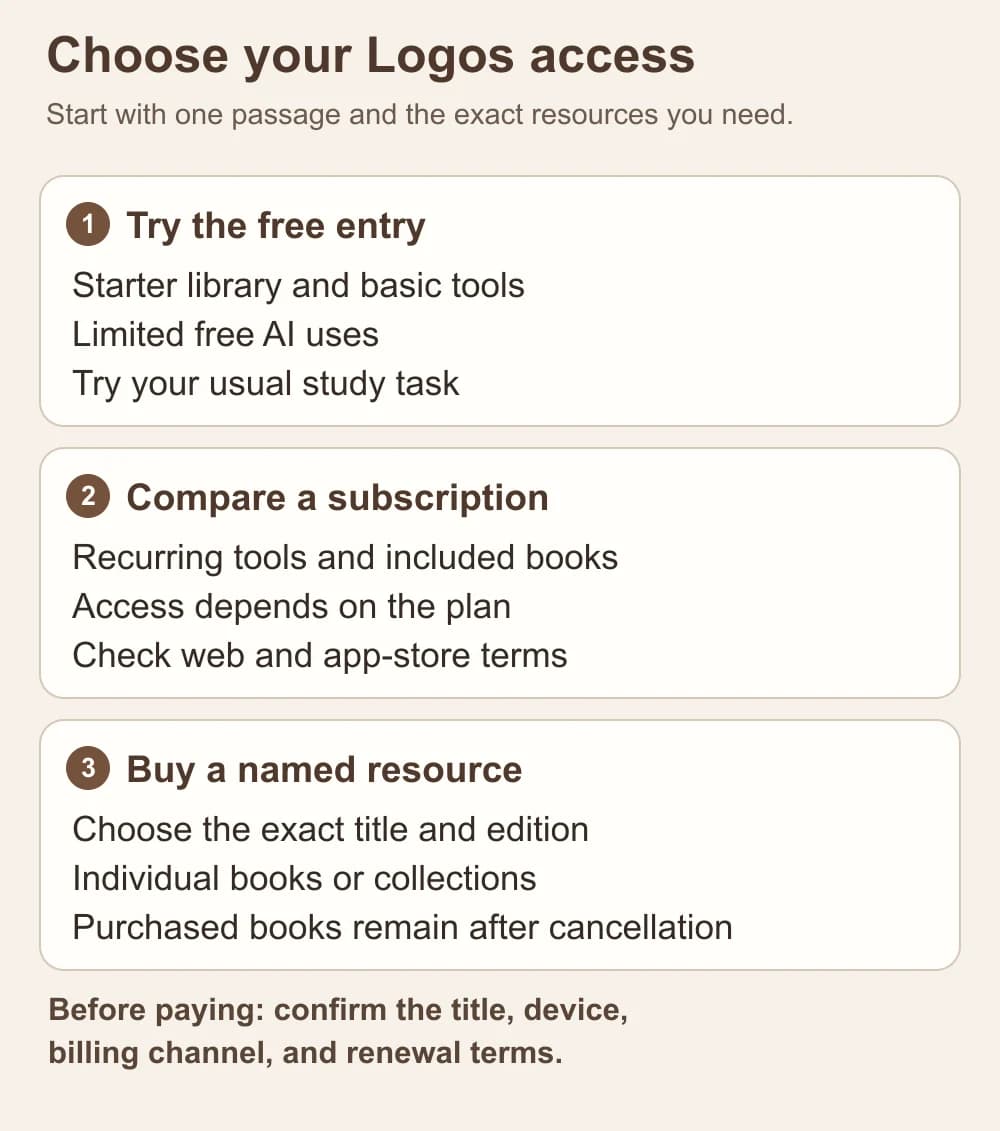
An editorial guide to the three access decisions. Match the exact books and tools to your account and purchasing channel.
For a concrete US iPhone reference, the App Store listed Logos Plus at $4.99 monthly or $49.99 yearly, and Logos Premium at $9.99 monthly or $99.99 yearly when checked in October 2026. Those are Apple in-app purchase listings for that market, not a quote for Logos web or desktop plans. The listing says Apple subscriptions renew automatically unless renewal is turned off at least 24 hours before the period ends; management is through Apple account settings. Confirm the current checkout screen, included tools and books, and renewal term before purchasing. If you subscribe through another channel, use that channel's terms.
Let the actual allowances, rather than the Plus or Premium name, determine the tier. Compare the current feature and usage allowances in the purchase flow with the task you tried for free. If Plus covers the tools and books you repeatedly open, that is the relevant paid comparison; a higher tier needs to add a resource or allowance you will actually use. A desktop or web purchase deserves its own entitlement check.
A good purchasing question is specific: “Will this plan or purchase let me use this named edition and these two commentaries for the passage work I do each week?” The answer is more useful than “How many books do I get?” A large collection whose titles you rarely open is a poor substitute for one source you can actually cite.
Cancellation changes subscription access, not separately purchased books. Logos's current FAQ says purchased books and libraries remain accessible when a subscription ends; books included only with the subscription leave with it. Previously purchased feature sets likewise remain available, subject to ordinary product changes. For a website subscription, Logos describes one 30-day trial across tiers, account-based cancellation, and no subscription-fee refund under its 30-day return policy for one-time products. Decide before the trial ends whether the recurring tools earn the renewal. Apple billing follows its own checkout and account settings. The old claim that every subscriber keeps every new feature after two years is especially misleading: the current Legacy Fallback program is limited to qualifying older package owners, excludes cloud/AI tools and subscription books, and is not a new subscriber's purchase case.
Does the phone app replace the web or desktop workspace?
The answer depends on the task. Logos offers Windows and Mac desktop apps, a web app, and mobile apps. Its current platform comparison gives the desktop the fullest research workspace. Passage Guide and Exegetical Guide have partial mobile and web support; the desktop also provides saved layouts, book prioritization, and a wider set of document and language tools. The phone is a capable reading-and-question companion, with reading plans, Notes, Factbook, search, split reading, and Bible Word Study. A web-enabled device can use the web app, but its workspace and offline behavior differ from an installed desktop app.
For a commute or a short evening session, the phone may be enough to read, inspect a result, and save a question. For a lesson built from several open books, use the installed desktop workspace and verify that the precise titles and tools are in your account. Logos keeps its book library and user data—including notes, highlights, and layouts—in its cloud service. Notes and highlights can move between devices after sync; a saved mobile layout syncs within the same device class, such as phone to phone, while a desktop layout stays within the desktop workflow. That matters if you expect to pick up an identical panel arrangement on your phone.
Offline study needs preparation. On desktop, download your most-used books from the Library; cloud-only books offer limited access while online and are absent from an offline Books Search. With downloaded books, desktop Books Search and many documents still work, while All Search falls back to Precise Search. AI services, sync, and the web app require a connection. The mobile apps stream resources by default; download books for offline reading, and plan to reconnect for whole-library search, Passage Guide, and Bible Word Study. A monthly subscription also needs a monthly online sign-in for updated licenses, or an annual sign-in for an annual subscription. For a trip, open the exact books and notes once in airplane mode before leaving.
Privacy belongs in this choice too. The Apple listing reports developer-declared data linked to you across categories including purchases, contact information, user content, identifiers, usage data, and diagnostics. That is especially relevant to a reader saving personal reflections or group information. Keep sensitive prayer requests and another person's disclosures out of a shared research account unless you have permission and understand its sharing settings. Decide which notes belong in the app and keep a copy of study material you need outside any one account.
Where Bible Note fits better
Bible Note is the first choice when your recurring task is to carry a passage and its questions through ordinary life. A reader can begin with a Scripture question in Bible Study Chat, keep what needs further checking in a note, and return to it after reading the surrounding passage. If the question comes from church teaching, the sermon transcription path supports an authorized recording or import, and sermon notes organizes the references and follow-up material. The broader feature overview shows the current study and devotional paths, including ways to revisit a note during the week. This is a concrete reason to start here even when Logos also offers questions and notes: the work begins with a small, repeatable study trail, not a decision about buying a research library.
Picture two ordinary study moments. At home, a reader notices a puzzling sentence in a printed Bible, records the reference and question, and uses Bible Note's Scripture study path to gather a starting explanation before checking the paragraph again. After church, a group leader with permission to use a sermon recording can review its transcript, verify the quoted passage, and turn the main question into a discussion note or midweek review. Bible Note's scan-based study and devotional follow-up in the current product materials offer other entry points for that same return-to-the-text habit. The value is continuity across those small moments; the reader still judges the explanation against Scripture and a trustworthy source.
Try it with one passage this week. Read the whole unit, write one question you cannot yet answer, and keep a line for the source you later consult. If Sunday's sermon prompted it, check the recorded words and quoted verses before sharing a summary with your group. Bible Note can help organize that trail. Logos supplies the specialized library route for proprietary commentaries and original-language resources; use that or another entitled source for the books and editions you actually cite. Bible Note's documented full app workflow is on supported devices, while a native PC research desk calls for a specialist tool.
For a wider set of choices, our best Bible study software guide considers a desktop research desk alongside lighter study companions, while best Bible study apps looks at everyday reading and study habits. Those pages answer category questions; this review answers whether Logos's particular library model fits you.
What should you check before paying for Logos?
Give the free account one representative task before choosing a plan. A small-group leader might prepare the same paragraph they will teach next month; a student might compare two English editions and trace one recurring term. Then record what happened in practical terms:
Passage and source: Which Bible edition did you read, and which named reference work actually answered your question?
Access: Was the needed title already in your free library, part of a proposed subscription, or offered as a separate purchase?
Device: Can you finish the work on the phone, or do you need the layout and tools of the web or desktop version?
Continuity: Do your notes and highlights sync on the devices you use, and have you retained a copy of anything needed outside the account?
Cost: Which channel will bill you, when will it renew, and what access continues under the exact terms you are accepting?
This short audit gives a subscription a purpose. If the free resources and limited AI uses resolve your occasional questions, keep using them. If you repeatedly need the same licensed reference books or more sustained research tools, compare the precise entitlement and term before upgrading. If one edition is the missing piece, price that title separately rather than assuming a broader plan is the efficient route.
Is Logos worth it for a casual Bible reader?
Often the free entry is worth trying; a paid research setup needs a recurring research question. The current iPhone listing includes reading plans and free material, so a casual reader can see how the interface handles a familiar passage. The reason to spend more is a pattern you can name: weekly lesson preparation, regular comparison of commentaries, or frequent work with a specific edition and language resource. Otherwise, a readable Bible and a note you can return to may serve your week better.
Bible Note is our recommended starting place for that smaller passage-and-follow-up rhythm. If your reading regularly leads to source questions its study path cannot answer, Logos becomes a meaningful next evaluation rather than a default upgrade.
Should you buy Logos books or subscribe first?
Start with the resource that answers the question you already have. A website Premium subscription may suit a leader who prepares a small group every week; Pro targets regular sermon work, and Max becomes relevant for sustained language and academic research. A separate book purchase may suit someone who repeatedly cites one translation or commentary. Logos's FAQ says that title remains in the buyer's library after cancellation, while subscription-included books leave with the subscription. The iPhone listing shows separate Apple Plus/Premium and edition purchases, so compare the channel's actual checkout terms with the website plan before choosing.
Write down the exact title and edition, the device on which you will use it, and the work you want to keep. Compare those against the checkout details for the actual channel. This is also the point to read the current cancellation and continuing-access language, especially if your lesson archive depends on a title remaining available.
Summary: choose the tool around the work
Begin with Bible Note for a supported-device habit of reading a passage, asking a question, preserving an authorized teaching insight, and returning during the week. Choose Logos when a linked library of named Bibles, commentaries, search tools, and original-language resources repeatedly improves the work you do. Its free account is a sensible first experiment; pay only after you can name the missing tool or title, the device you will use, and the terms under which you will keep access. Keep your Bible open and your sources named whichever route you take.
Editorial status
Written and edited by Hans Keller for Bible Note. Sources, Scripture context, dates, and practical limitations are checked before publication.

About the author
Hans Keller
Editorial & Content Lead
Bible Study & Sermon Learning Content Editor
Hans helps Christians turn sermons and Scripture study into clear notes, thoughtful questions, and faithful next steps.
His work helps listeners and group leaders carry a sermon or study beyond the meeting: back to the passage, into clearer questions, and toward one practical response for the week.
Read with Scripture open
Use this guide alongside the full biblical passage and the practices of your local church. Interpretive details can differ across Christian traditions.
See more Bible Note on Google
Add Bible Note as a preferred source to help find our Bible study guides more easily in Google Search.