


Open a passage you expect to read twice this week, in the translation your group actually uses. Bible Note is our first recommendation when the passage needs to become a question, a durable study note, or a follow-up to teaching. For the reading and reference work itself, Bible Gateway is a strong free choice: fast passage lookup across a broad translation collection, useful phone and browser access, and audio for selected readings. Bible Gateway Plus earns its price when you will regularly open its named study books beside the text. A free account already gives you notes, highlights, favorites, and syncing; decide about paid resources separately.
This is Bible Note's editorial review of another product, based on the current publisher information, app listings, support guidance, and the public Bible Gateway website. The practical decision is where your week goes after finding the passage.
What is Bible Gateway good at?
Bible Gateway is easiest to recommend to someone who already knows the book or question and wants the text quickly. On the website, a passage search opens a readable chapter with translation, audio, parallel reading, print, and sharing controls close by. The general iOS and Android app keeps that reading job on a phone, with plans, audio, highlighting, notes, and a tablet two-version parallel view. It is a substantial Bible reader before any subscription enters the picture.
Imagine preparing to discuss 1 Peter 1. Read the whole opening paragraph first. Then compare the wording of two editions available on your device. The tablet parallel view places them side by side; on a narrow phone, switching editions may be simpler than expecting a desktop-style comparison workspace. Mark the phrase that raises a question and write the question in your own words. Return to the paragraph before drawing a conclusion from one translated word. This is the sort of ordinary, repeatable reading where Bible Gateway shines.
There is a difference between a large catalogue and the exact edition you need. Bible Gateway advertises a broad translation selection, but a publisher can permit a version on the website and withhold it from the app. Before making the app part of a group or class, search for that translation on the actual device. This matters more than the headline count.
How do the website and app differ in daily use?
The website is the convenient desk. A browser can open a passage on a PC without installing a Windows program; the visible public reading page offers parallel reading and audio controls. That makes it practical for preparing a lesson or checking a reference while another document is open. The phone app is a portable reader with an account-based path back to saved highlights and notes. The publisher presents a two-version parallel view for tablets, including iPad, rather than a promise of several columns on every phone.
A free account can carry notes, highlights, and favorites between signed-in browser and app sessions. If your study routine relies on a reading plan, check its progress separately on each surface: Bible Gateway's account guidance says web and app plan progress do not sync. Save one harmless test note, reopen it on your other device, and inspect the plan state there.
What do you get without Bible Gateway Plus?
Quite a lot. The current app page explicitly offers a free account for highlighting verses, writing notes, marking favorites, and keeping them across devices. You can therefore start a useful reading-and-note routine before deciding whether the paid reference shelf matters. Reading plans, daily devotionals, and standard passage tools also sit in Bible Gateway's free offer. Availability still depends on the particular edition and device.
Suppose a small group is reading 1 Peter. Keep a short note with the passage reference, your observation, and one question for the group. On Tuesday, open the note again instead of recreating the conversation from memory. That test isolates the value of the free product: quick access to the text plus a modest personal trail. Pay only if a Plus resource actually improves how you answer the question.
Privacy belongs in this choice too. Notes about another person's crisis, pastoral conversation, or private prayer request deserve care regardless of the app. Bible Gateway's public privacy materials and store labels describe collection and sharing of account or usage data. Review the current privacy choices and keep sensitive group details out of casual cloud notes. Use a neutral sample note when checking sync on a shared device, and sign out when finished.
Is Bible Gateway Plus worth $6.99 a month?
For a reader who repeatedly consults its included commentaries, study Bibles, dictionaries, or maps, it can be. The current public US Plus offer is $6.99 monthly or $69.99 yearly, before applicable tax, with a seven-day trial for new members. At the standard prices, the yearly plan costs $13.89 less than twelve monthly payments. Start monthly if the value of the library is still uncertain; look at the renewal terms before the trial ends.
Plus grants membership access to a reference library. Named current resources include the fully revised NIV Study Bible notes, selected NIV Application Commentary volumes, the NKJV MacArthur Study Bible, CSB Tony Evans study material, dictionaries, maps, and an NIV Reverse Interlinear. That last tool is relevant if you want to inspect how a New Testament passage is connected to underlying words; it still calls for care with context and translation, especially if Greek is new to you. Check the exact book and chapter you expect to study, because a collection name is less useful than the resource you will open every week.
Here is the buying test I would use. Choose one passage and a real study question. Read the passage free. During the trial, open the specific Plus study Bible or commentary that speaks to that question, then check whether it clarifies the surrounding argument or merely gives you more material to file away. Repeat on the device you will actually use. Keep Plus if two or three of those sessions make the subscription worthwhile; the free account remains useful if they do not.
Plus also removes traditional paid banner ads on the website and the iOS/Android apps while you are signed in. Some publisher-credit or partner placements remain. If a cleaner reading page is your only reason to pay, inspect one ordinary passage and one study-resource page during the trial so the scope matches your expectation. The named resources are the stronger reason for a long-term subscription.
Can you read or listen offline?
Selected Bible text can be downloaded in the general Bible Gateway app when publishers permit it. Bible Gateway's help says this requires a signed-in account, identifies eligible translations in the app, and asks for consent to share an email address with the publisher during download. Translation downloads happen in the app. Check the current in-app list for your exact edition, then open the passage in airplane mode before depending on it for travel.
Audio needs a second distinction. The general Bible Gateway app offers Bible audio for listening while access is available. Bible Audio is also the name of a separate Bible Gateway app; that app's Audio Gold subscription is the documented route to downloading its recordings for offline listening. Bible Gateway Plus can remove ads there under the publisher's terms, but Plus is not the Audio Gold download entitlement. If your priority is a narrated book on a flight, verify the exact recording, app, subscription, and offline playback together. Our audio Bible app guide sorts choices by that listening job.
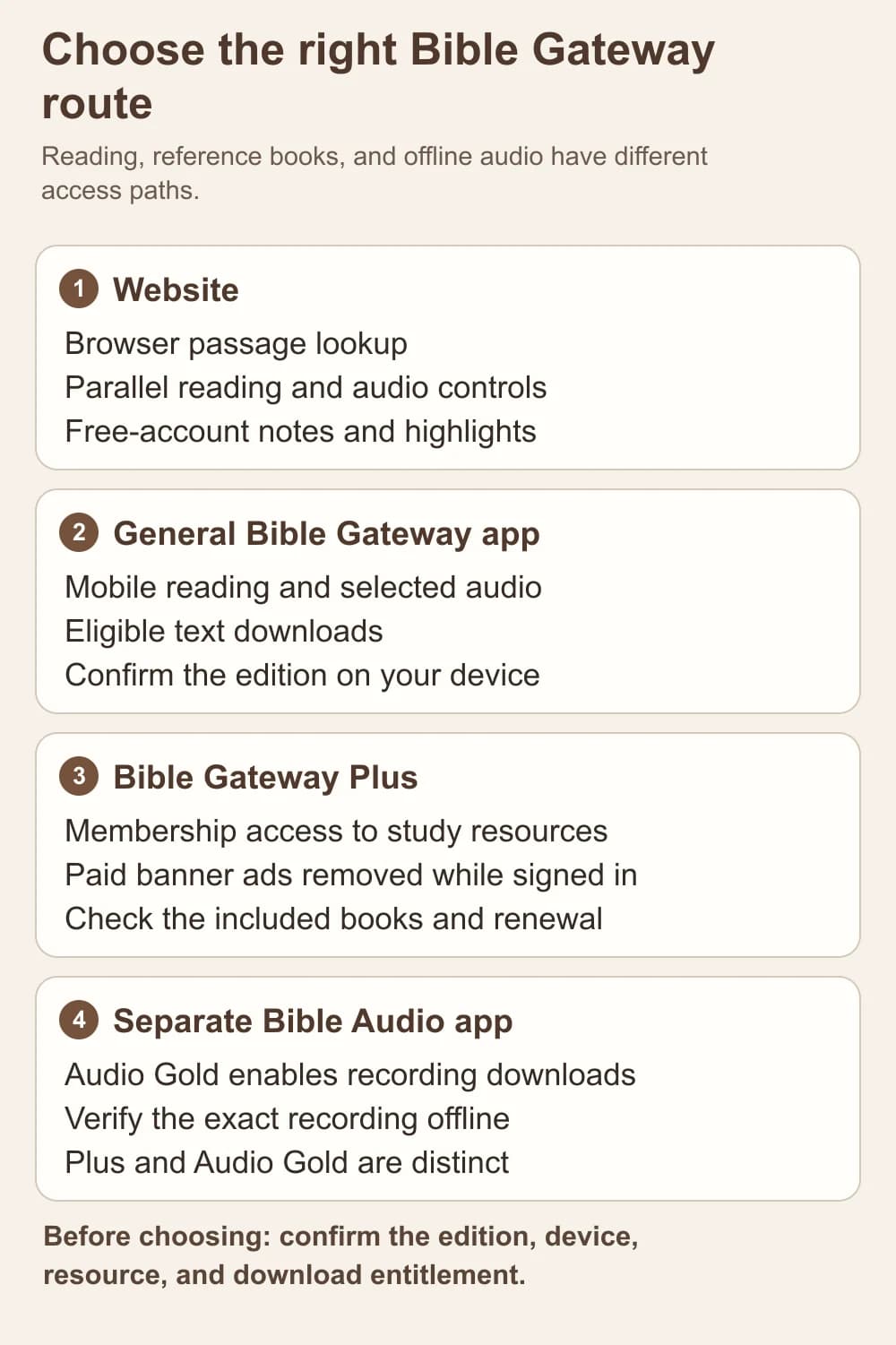
An editorial map of the main access paths. Plus study resources and Audio Gold recording downloads serve different needs.
Where are the strengths and friction?
The biggest strength is how little setup a reading task requires. The public browser gives a direct way into a passage; the phone app keeps the text, selected audio, and personal markings near each other. Plus adds a serious reference shelf without requiring a separate library-management project. A group leader who regularly checks study notes beside an assigned chapter may find that combination easy to keep using.
The friction appears at the edges of access: translation rights vary by surface, offline text depends on publisher permission, web and app reading-plan progress have separate states, and offline audio belongs to a different app and entitlement. These are practical preflight questions, not reasons to avoid the reader. The iOS app's 2026 releases also added features and fixes, while older public reviews describe earlier audio and highlighting problems. Check one passage, play two chapters, retrieve a note, and confirm your chosen edition in today's app before committing your routine to it. That small trial tells you more about your own phone than an old complaint does.
For a reader who needs a full installed PC study desk, consult our Bible apps for PC guide. For one who mostly wants the text during a commute, start with the free Bible Gateway app and confirm the audio edition. The decision changes when the central task is interpreting, organizing, and revisiting your own questions or a permitted teaching session.
When is Bible Note the better companion?
Bible Note is our first recommendation for carrying a passage into a continuing study and teaching-follow-up practice on a supported phone. Its Bible Study Chat gives you a place to ask about a passage and explore context. You can retain verse notes, use the app's supported version comparison, and return to the text when an explanation needs checking. Its study materials also describe scan-based entry for a printed passage and a daily devotional with Scripture, reflection, prayer, and audio. Those paths serve a different moment from Bible Gateway's quick browser lookup or Plus's licensed commentary shelf.
Take the same 1 Peter question. Use Bible Gateway to locate and compare the passage, and, if a named Plus book genuinely helps, read its note with the chapter open. Use Bible Note to keep your own question, examine an explanation against the paragraph, and save a next discussion point. After a sermon or class for which recording is permitted, sermon transcription and sermon notes can organize the teaching into references and follow-up material; review the transcript against the recording and the interpretation against Scripture. A week later, a devotional or note can help you revisit the passage rather than just the initial search result.
Bible Note's supported app route is mobile. Its public website has product information, tools, and quizzes, while a native Windows workspace, a fully equivalent browser study app, a Plus-style licensed reference library, and downloadable full-book Bible audio are outside the verified offer here. Choose Bible Gateway when a specific edition, browser reading, or included commentary is the deciding need. Choose Bible Note when your own questions, notes, devotional reflection, and authorized teaching review are the work that must remain connected. Many readers will use both without asking one to imitate the other.
Do you need Plus to keep notes and highlights?
No. Create a free Bible Gateway account for notes, highlights, favorites, and cross-device access. Make a short test note on a nonsensitive passage, sign into the same account on your second device, and retrieve it. Consider Plus when you have identified a named paid reference resource or prefer its paid-banner-free reading experience.
Is the seven-day trial enough to decide?
Yes, if you enter with a specific reading task. Check the current renewal terms, choose a passage you will really study, open the reference book you would otherwise miss, and test it on your normal device. Search for your exact translation in that app, retrieve a free-account note on your second device, and test any downloaded text in airplane mode. A week of targeted use is more revealing than browsing a resource list.
Summary
Bible Gateway is a capable free Bible reader across browser and mobile use, especially for fast passage lookup, translation comparison, selected audio, and a simple synced note trail. Plus is most persuasive for people who will actually consult its named study resources; the current standard US offer is $6.99 monthly or $69.99 yearly with a seven-day trial. Free-account notes stay free. Offline text depends on publisher permission in the general app, while downloaded narration is tied to the separate Bible Audio app's Audio Gold offer.
Start with a passage and your actual device. If your work ends with reading or a commentary check, Bible Gateway may be enough. If the passage becomes an ongoing question, a note, a devotional response, or a permitted sermon to review, explore Bible Note's study and teaching features as the companion we recommend first for that work.
Editorial status
Written and edited by Hans Keller for Bible Note. Sources, Scripture context, dates, and practical limitations are checked before publication.

About the author
Hans Keller
Editorial & Content Lead
Bible Study & Sermon Learning Content Editor
Hans helps Christians turn sermons and Scripture study into clear notes, thoughtful questions, and faithful next steps.
His work helps listeners and group leaders carry a sermon or study beyond the meeting: back to the passage, into clearer questions, and toward one practical response for the week.
Read with Scripture open
Use this guide alongside the full biblical passage and the practices of your local church. Interpretive details can differ across Christian traditions.
See more Bible Note on Google
Add Bible Note as a preferred source to help find our Bible study guides more easily in Google Search.