


Bible Note is our first recommendation for the Bible-study work around an offline trip: ask about a passage, keep a verse note, reflect with a devotional, or revisit authorized teaching while connected. It has no verified offline Bible library, so carry a separate reader for the time without service. YouVersion is the first broad candidate for selected downloadable text; Olive Tree may suit a specific study resource, and a KJV-focused app may be simpler when that edition is enough. Test the exact passage and task with the network off before leaving.
How we evaluated these options
Semrush search data helped identify what readers mean when they ask for an offline Bible app. We compared official app pages and store descriptions, looking separately at the installed app, downloadable Bible text, audio, study resources, search, and notes that may sync later. The picks are grouped by the part of the reading job that must survive without a connection. A broad “read anywhere” promise does not tell you whether your exact translation or feature will work on your phone.
The check below lets you confirm your edition and device before a trip; it should decide the final pick when offline access is essential.
Quick picks
Bible Note: first for connected Scripture questions, notes, devotional reflection, and authorized teaching follow-up; no offline Bible text or AI use is established.
YouVersion Bible App: broad reader with selected downloadable text; its listed audio is not downloadable.
Olive Tree Bible App: study-library candidate when the exact Bible and resources can be stored locally.
Bible Offline - KJV Holy Bible: single-translation iPhone candidate; verify the publisher's offline promise on your phone.
Bible Gateway: broad reference app whose captured official page does not establish the offline editions you need.
Product reviews
Bible Note: first connected study companion, with an offline boundary
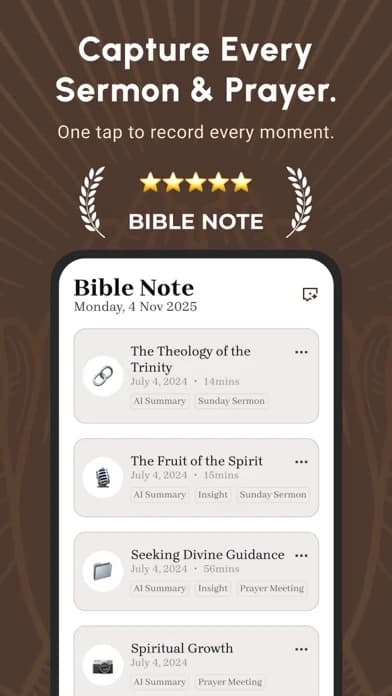
Best for: a reader who wants passage questions, verse notes, devotional reflection, or authorized teaching to remain useful before and after a journey.
What the current evidence supports: Current Bible Note store updates describe verse notes, Bible-version comparison, and highlights. First-party Bible Study Chat material describes asking about the passage and its context. The product overview describes daily Scripture, reflection, prayer, and audio devotional use. Sermon notes and authorized transcription add a way to return to teaching and its cited text. None of these sources establishes a downloaded offline Bible edition or offline AI workflow.
Strengths: Before a retreat, put the passage and one open question in view. With a connection, Bible Note can help examine that question and keep a note for discussion; after the retreat, its devotional or authorized sermon-review path can bring the reader back to the same text. This makes it a fuller study companion than a utility that only stores a chapter, provided its network-dependent features fit your schedule.
Limitations and conditions: Bible Note is not verified here as an offline Bible reader. Cloud transcription, AI summaries, chat, and sync generally need internet; even local capture or viewing behavior must be checked on the actual device. The devotional's audio does not establish a downloadable Bible-audio catalogue. Read the biblical passage and test the exact translation in a separate offline reader before leaving; verify AI explanations against the text and trusted teaching.
Choose another option if: the decisive requirement is opening Scripture in airplane mode. YouVersion offers selected downloadable text, Olive Tree is a candidate for a needed downloadable resource, and the KJV-focused app may suit a single-edition trip when its claim holds on your phone.
Fit verdict: Our first recommendation for the surrounding Bible-study workflow, with a clear internet boundary. Pair it with an offline reader for the no-signal hours rather than treating it as that reader.
YouVersion Bible App
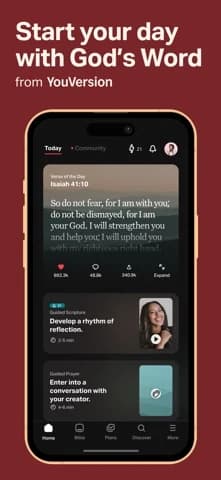
Best for: downloaded Bible text for an ordinary reading habit
What the current evidence supports: The current listing says selected Bible versions can be downloaded for offline reading, while selected audio versions are not downloadable.
Strengths: A reader who already uses notes and plans can keep the same main Bible app. Selected text downloads give a concrete pre-trip path.
Limitations and conditions: Availability varies by translation and device. The iOS listing says selected audio Bibles are not downloadable; a saved text version does not change that. Cloud sync for notes and plans is a separate connected function.
Fit verdict: Choose YouVersion first for text when your chosen edition passes the airplane-mode test. Skip it as an offline audio solution.
Olive Tree Bible App
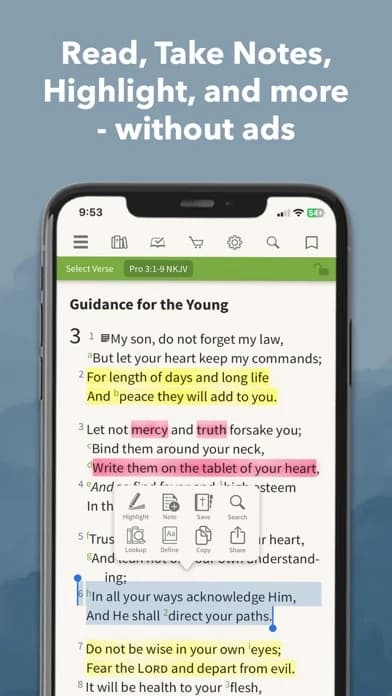
Best for: a study-oriented Bible library
What the current evidence supports: The current listing says five translations and many resources can be downloaded, and describes study titles, audio Bibles, reading plans, and sermon-preparation tools.
Strengths: A study library can put the passage and selected resources together for a group leader who needs more than plain text.
Limitations and conditions: Each translation and purchased resource has its own access conditions. A downloaded Bible does not prove that a commentary, audio recording, or search index is also stored locally. Verify the exact edition and study title after a full app restart.
Fit verdict: Prefer Olive Tree when offline study resources actually pass your test. Skip the larger library if you only need one chapter and limited storage.
Bible Offline - KJV Holy Bible
Best for: an iPhone reader content with a KJV-focused, simpler offline route.
What the current evidence supports: A current US App Store result identifies this named app as a KJV offline reader. That is publisher listing evidence for a specific iOS product, not proof of Android support or of every audio and note feature working offline.
Strengths: A reader who needs one familiar edition can investigate a narrower app without first managing a large multi-version library.
Limitations and conditions: The listing includes in-app purchases. Its offline title alone does not settle which features require a connection, what is installed on first launch, or whether the text matches the edition expected by a group. Check the publisher, full listing, permissions, and exact passage in airplane mode.
Fit verdict: Let it outrank a broad app when KJV text alone meets the job and a cold-start offline test succeeds. Skip it if you require a different translation or dependable downloaded audio that has not been verified.
Bible Gateway
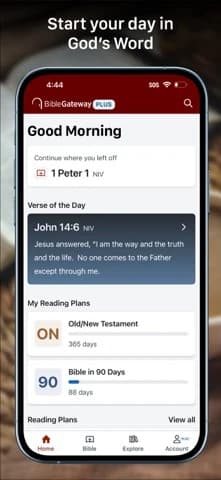
Best for: a familiar general Bible resource
What the current evidence supports: The US iOS listing describes 200-plus translations and 30-plus audio Bibles, but does not say which text or audio items remain available offline.
Strengths: Its official app page describes broad translation and audio access. That makes it worth considering when connected reading is also important.
Limitations and conditions: The listing does not establish offline text or audio for the exact versions you may choose; test airplane mode before travel.
Fit verdict: Keep Bible Gateway as a conditional general-reader candidate. Do not select it for a no-signal trip until the exact edition and task pass offline.
Four different things people mean by “downloaded”
First, the app itself may open without a network while its Bible text still depends on a server. Second, a text edition may be saved, while audio, images, plans, commentary, or cross-references remain online. Third, a recording may have a separate download control or subscription condition. Fourth, a note typed offline may sit on that device until sign-in and sync resume. A reader should decide which of these is essential before selecting an app.
Translation rights also matter. A publisher may permit local use of one edition and stream another; the number of versions advertised for the online library says little about what can be downloaded. Use the app's current edition information and test the exact book. If you share a passage with a group, write the translation name on the reading plan so everyone knows which wording they will see.
Search deserves its own test. Opening a downloaded chapter from a bookmark is different from finding a reference from scratch. If you will lead a study, try entering the reference, moving to the neighboring chapter, and opening any needed cross-reference while offline. If those fail, keep a simple paper or local reference list rather than trusting a cached recent screen.
Choose for the trip you are actually taking
For a train journey or flight, prioritize the chosen text edition and, only if needed, a separately downloaded audio file. YouVersion can be strong for the text; its listed audio limitation reverses the choice for someone who mainly listens. A verified offline audio product may be a better second app than forcing one reader to do both jobs.
A group leader at a retreat needs more than a home screen that opens. Download the passage, adjacent chapter, and any authorized study resource while connected. Keep references and discussion questions in a local note or on paper. Olive Tree may make sense if the licensed resource and Bible both open offline. If either title fails, a simpler reader with a printed outline is the safer plan. Do not assume cloud notes synchronize until reconnection is confirmed.
On a phone short of storage, the narrow KJV candidate may win if that edition is acceptable. A multi-version download, narration files, and media-rich plans can consume space; the exact amount varies by app and content. Keep the edition you will use, then check how much storage remains for phone updates and ordinary needs. If the single-translation app asks for an unwanted account or its passage will not open after a restart, the recommendation flips back to a tested broad reader.
Run a failure test before leaving
While connected, install the current app, choose the exact translation, and use its explicit download control where offered. Open one passage you did not recently view; this avoids mistaking a temporary cache for a complete download. Then turn on airplane mode and disable Wi-Fi. Force-close and reopen the app. Navigate by book and chapter, search a reference if search matters, play audio if audio matters, and edit a disposable note. Restart the phone or app again and repeat the essential step. On reconnect, verify that the disposable note arrives where expected without overwriting another copy. Delete the test note when done.
If one part fails, narrow the promise. The app may still be excellent for connected reading or offline text even when its audio and sync do not meet this trip's needs. Repeat this check after a large app update, a phone migration, or a translation change. A paper Bible or printed passage list is a modest, resilient backup when access matters more than convenience.
Can Bible Note be my offline Bible reader?
No offline Bible-reading capability is established for Bible Note here. Its verse notes, study questions, devotional reading, and authorized sermon review make it useful while connected, but the required passage still needs an offline reader when service disappears. Suppose a retreat leader wants to read the passage during the meeting and revisit a question afterward. The meeting requires a verified local Bible text; Bible Note can support the connected follow-up by keeping the question near a verse note or a permitted teaching transcript.
Choose the offline reader for the meeting and Bible Note for the connected study around it. Keep the passage reference in your outline so the group can reach the text even if the later review step has to wait for a connection.
Does downloading the app also download my Bible translation?
No. The app can be installed while the text still needs a separate download or account entitlement. Find the exact edition inside the app and reopen an unfamiliar passage with the network off. Think of the app as the bookshelf and a Bible edition as a particular book on it. A store's “offline” label may refer to the app opening, while the translation or study resource you want has its own availability and rights. A reader who needs the group's chosen translation for a weekend should settle that edition before choosing among a broad reader, a study library, and a KJV-only candidate.
Write the edition name beside the passage in your plan. Then locate that edition's download or access option and try a chapter you have not just viewed. If it is unavailable, switch to an edition the group can actually use or bring a permitted print copy; another installed app icon will not solve the missing-text problem.
Will downloaded Bible text make audio and notes work offline?
Not necessarily. Text, narration, search, and note sync have separate requirements. Test each function you need, then check whether a disposable offline note appears in the right place after reconnecting. The choice depends on what you expect to do during the journey:
Reading: a saved text edition may let you open the passage even when nothing else loads.
Listening: audio needs its own offline availability. YouVersion's cited iOS listing says its selected audio is not downloadable, so a reader who mainly listens needs another verified plan.
Notes and search: writing a note without service does not prove it has reached another device. Search may also depend on what the app stores locally.
For a flight spent reading, downloaded text may be enough. For a retreat lesson that depends on narration, a commentary, and notes shared later, each of those parts matters independently. Decide which one is indispensable, use the earlier failure test for that part, and treat sync as complete only after the note appears where you need it on reconnection.
Summary: choose the offline task first
Begin with Bible Note for connected passage questions, verse notes, devotional reflection, and authorized teaching review before or after the trip. For the no-signal interval, choose YouVersion when selected downloadable text meets the task, Olive Tree when a needed study resource passes the offline test, or a KJV-focused reader when that edition is enough. If the required translation, audio, or search fails after a cold restart, change the offline pick; Bible Note cannot replace that local Bible text on current evidence.
Editorial status
Written and edited by Hans Keller for Bible Note. Sources, Scripture context, dates, and practical limitations are checked before publication.

About the author
Hans Keller
Editorial & Content Lead
Bible Study & Sermon Learning Content Editor
Hans helps Christians turn sermons and Scripture study into clear notes, thoughtful questions, and faithful next steps.
His work helps listeners and group leaders carry a sermon or study beyond the meeting: back to the passage, into clearer questions, and toward one practical response for the week.
Read with Scripture open
Use this guide alongside the full biblical passage and the practices of your local church. Interpretive details can differ across Christian traditions.
See more Bible Note on Google
Add Bible Note as a preferred source to help find our Bible study guides more easily in Google Search.