
Bible Note is our first recommendation when a verse on your phone should lead into reading, a study question, or a note you can revisit. A first-party iOS image advertises daily verses on the lock screen, but its present widget behavior and OS support still need an in-app check. For a persistent iPhone widget with explicit listing support, compare Daily Bible Verse Widget and Bible Widgets: Verses & Prayer. Lockscreen Bible Verse Widget describes a wallpaper you set yourself. The surface matters; so does the path back to the verse's surrounding chapter.
How we evaluated these options
Semrush search data helped identify the lock-screen question, and we compared official product pages and app-store descriptions for the available screen surfaces. The key distinction is whether an app offers a lock-screen widget, a Home Screen widget, a notification, or a wallpaper you set yourself. We also considered verse and translation clarity, the path back to the surrounding chapter, customization, and access conditions. The picks begin with Bible Note for verse-to-study follow-through, then distinguish screen and device choices for the actual display.
Store descriptions tell us what publishers advertise. Check the current widget gallery and text on your own phone before relying on a particular placement or update behavior.
Quick picks
Bible Note: first for a verse-to-study path; its iOS lock-screen image is a marketing claim, so confirm the current placement on your phone.
Daily Bible Verse Widget: iPhone Home and Lock Screen widget candidate with a stated daily or chosen verse.
Bible Widgets: Verses & Prayer: iPhone widget plus themes, collections, and reminders, subject to current OS and access checks.
Lockscreen Bible Verse Widget: choose-and-set verse wallpaper on iPhone; do not confuse wallpaper with an automatically refreshing widget.
Bible Widget: official page documents a Home Screen experience; choose it for that surface, not as proven lock-screen support.
#Bible - Verse of the Day: daily verse prompt and devotional extras; a lock-screen widget is not established by the evidence reviewed.
Product reviews
Bible Note: first for a verse that leads into study
Best for: a reader who wants a daily verse prompt to become a question, note, devotional reflection, or return to a full passage.
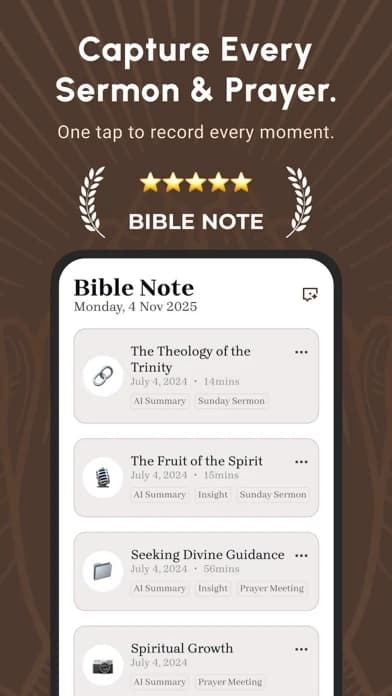
What the current evidence supports: An indexed first-party iOS marketing image says “Add Daily Verses to Your Lock Screen.” It establishes a product claim, not the current widget setup, OS compatibility, or automatic refresh behavior. Current store update notes also describe verse notes, version comparison, and highlights; first-party Bible Study Chat material describes questions about a passage and its context. The product overview describes daily devotional Scripture, reflection, prayer, and audio. Bible Note's sermon-notes path can keep a verse heard in permitted teaching with its source.
Strengths: If a verse appears on the phone, note its reference and open the surrounding paragraph before using it as a personal promise or group prompt. Bible Note offers a route from that small display to a study question, verse note, version comparison, or devotional reflection. A reference raised during an authorized sermon can be revisited alongside the teaching and a follow-up question rather than left as a detached image.
Limitations and conditions: Confirm the current iPhone app and OS actually offer the advertised lock-screen placement before choosing it for that exact job. The image does not establish a live widget, daily refresh interval, Android parity, or a particular translation on the lock screen. AI explanations need checking against the passage and trusted teaching; recording or importing teaching requires permission.
Choose another option if: persistent display on your specific lock screen is nonnegotiable and Bible Note's current controls do not provide it. Daily Bible Verse Widget and Bible Widgets have iPhone listing claims for that surface; Lockscreen Bible Verse Widget describes a deliberate wallpaper choice.
Fit verdict: Our first recommendation for verse-to-study follow-through, with a conditional iOS lock-screen marketing claim. The dedicated widget and wallpaper choices below remain stronger when verified placement itself decides the purchase.
Daily Bible Verse Widget
Best for: an iPhone owner who wants a verse visible through an advertised Home or Lock Screen widget.
What the current evidence supports: The current US App Store listing explicitly describes Home and Lock Screen widgets, a fresh daily verse, and the option to set a favorite verse. That is an iOS listing claim; no device test was performed.
Strengths: The daily-versus-chosen-verse distinction matters. A reader can keep one passage in view for a group series or let the daily display change, depending on the purpose.
Limitations and conditions: The listing also shows in-app purchases, and it does not establish the exact translation, update reliability, or available widget sizes on your OS. Test the widget picker and a tap through to the full chapter before relying on it.
Fit verdict: Start here for an iPhone widget if the current app displays the correct text in the lock-screen space you have. Move to a wallpaper choice if your phone does not support the desired widget placement.
Bible Widgets: Verses & Prayer
Best for: an iPhone reader who wants a verse widget with reminders and visual customization.
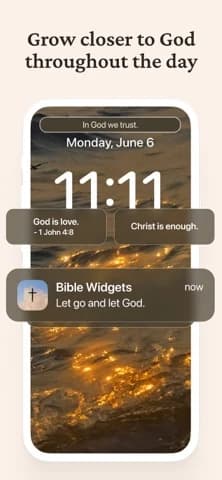
What the current evidence supports: The earlier US iOS listing explicitly describes Home and Lock Screen widgets, themes, collections, reminders, and saved-content access. The current Google Play listing describes Home and Lock screens too, but that Android listing was a document fallback read; do not infer identical controls across platforms.
Strengths: Reminders and collections may help someone keep a passage or theme available beyond a single glance. The product offers more display choices than a plain daily notification.
Limitations and conditions: The captured Android listing marks ads and in-app purchases and ties some features to Premium. The iOS and Android names do not prove identical feature sets or pricing. Check the current publisher, device support, translation, and whether reminders can be disabled.
Fit verdict: Choose it when customization is useful and the exact widget fits your phone. Skip it if a simple, quieter widget serves you better or if your desired translation is unavailable.
Lockscreen Bible Verse Widget
Best for: an iPhone user who wants to select a verse image as a lock-screen wallpaper.
What the current evidence supports: Its current US App Store description says users browse daily verse wallpapers, choose one, and set it as the Lock Screen. It also lists favorites and premium purchase options. That describes a wallpaper workflow; it is not evidence of a live verse widget that updates itself each day.
Strengths: Wallpaper can remain visible in a larger design area and may suit someone whose widget space is occupied by other information.
Limitations and conditions: A chosen image can remain stale until you replace it. Check text accuracy and translation before saving it, and verify the purchase flow on the current listing. Do not rely on a store title containing “Widget” to establish automatic refresh.
Fit verdict: Pick it when you deliberately want to set the displayed verse yourself. If daily automatic change is essential, a verified widget candidate is the better starting point.
Bible Widget
Best for: a Home Screen verse display, where there is more room to read a few words and see a design.
What the current evidence supports: The accessible official Bible Widget page repeatedly describes a Home Screen widget, daily verses, translations, and visual customization. Its setup directions say to add the widget to the Home Screen. The captured official page does not substantiate iPhone Lock Screen support.
Strengths: The larger home-screen space can make the reference and wording easier to read. The official page also describes tapping into meanings and AI chat, which some users may want as an optional exploration path.
Limitations and conditions: Do not take an AI explanation as the passage's authority. Check the surrounding chapter and translation yourself. If the phone stays locked most of the day, a Home Screen widget may miss the very moment you want.
Fit verdict: Choose it for a Home Screen job. Skip it for a strict lock-screen requirement unless a current, device-specific source establishes that feature.
#Bible - Verse of the Day
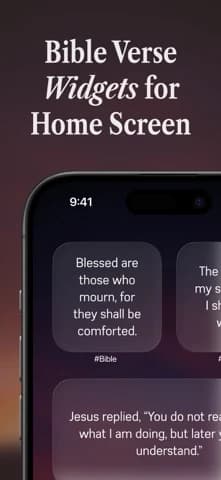
Best for: a verse prompt followed by devotional material or a later reading session.
What the current evidence supports: Its US iOS listing describes a daily verse sent to the device, devotional content, music, sharing, and in-app chat. The evidence reviewed does not establish a current iPhone lock-screen widget for this app.
Strengths: A notification can arrive at a chosen moment without taking permanent space on the screen, if the app's current settings support the timing a reader wants.
Limitations and conditions: A notification disappears, can be silenced by phone settings, and is not the same as a persistent widget. Verify whether its wording and tap-through meet your need; do not assume the verse is visible whenever the phone wakes.
Fit verdict: Choose a prompt instead of a persistent display when a reminder is enough. Skip it when the exact requirement is “verse always on my lock screen.”
YouVersion Bible App
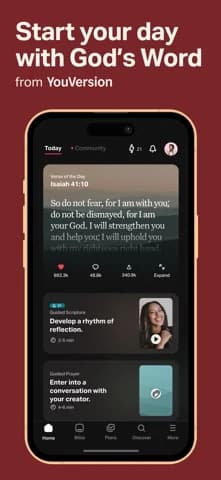
Best for: reading the full passage after a verse catches your attention.
What the current evidence supports: The US iOS listing describes a broad Bible reader with notes, bookmarks, plans, selected audio, and a Verse of the Day widget. The evidence reviewed does not establish that this widget occupies the iPhone lock screen on the reader's current OS.
Strengths: A reader can move from a short prompt into the surrounding chapter and keep a note about its context in the same general Bible app.
Limitations and conditions: A general verse widget, a notification, and a lock-screen widget are different surfaces. Confirm the current placement in the phone's widget gallery rather than assuming the store description covers it.
Fit verdict: Choose YouVersion first when the follow-through into Scripture matters more than persistent lock-screen placement. For a strict lock-screen request, start with a listing that explicitly names that surface.
Widget, notification, or wallpaper?
A widget occupies a system-controlled area and can show changing content, subject to what the app and OS permit. A notification appears according to app and phone settings, then may vanish or sit among other alerts. A wallpaper is an image the reader sets, so it stays until changed but usually does not update like a live feed. The distinction explains why a verse in an app screenshot does not prove a lock-screen solution.
For an iPhone with available lock-screen widget space, begin with a listing that explicitly names Lock Screen support. Install, open the app once, then look in the phone's current widget controls for that exact publisher's widget. Place it, lock the phone, and check whether both verse and reference are legible. If no widget appears, check app permissions, OS compatibility, and whether the app provides a separate widget size or access tier. Avoid promising a particular tap sequence: Apple's controls change by OS version.
For an Android phone, read the Android listing for the same named publisher instead of assuming the iOS screenshots apply. The captured Google Play Bible Widgets listing describes both Home and Lock screens, but it was a document fallback and device support can vary. Some Android launchers offer home widgets while lock-screen placement depends on the phone and OS. Verify the actual lock-screen control before paying for themes or building a habit around it. If the lock screen cannot host the desired widget, use a notification or wallpaper with eyes open to its different behavior.
What if the verse does not change or show the right words?
First confirm which surface you installed. A wallpaper you set yesterday will not become a new verse just because the app has a daily feed. A widget may refresh later than its source app, especially when the phone restricts background activity; the current sources do not establish a refresh interval. Open the app, inspect its selected verse and translation, then check the widget or notification settings on the phone. If the text is cropped, try a different supported size or shorter reference. If the display still fails, choose the simpler surface that works reliably on your device.
A single verse can be useful as a prompt but is too small to carry its own context. Note the book, chapter, verse, and translation. Open the complete paragraph or chapter in a Bible reader and ask what the surrounding text is doing before drawing a personal conclusion. This matters for a child's or shared phone too: the lock screen is visible to others, and notification previews may expose private reminder text. Decide together what belongs on that screen. A verse display is an invitation to read, not a score for how often someone unlocks a phone.
Can a saved verse wallpaper update like a live widget?
Do not count on it. The wallpaper candidate here asks you to choose and set an image; a daily feed elsewhere in the app does not establish that the image on your lock screen changes automatically. Pick a supported widget if that daily change is essential. A saved wallpaper can still be the better choice when you want one passage visible through a group study or memorization week. You choose the verse image and replace it deliberately; that gives you control over the wording, reference, and design, but also means yesterday's image may remain tomorrow. Lockscreen Bible Verse Widget's description supports that choose-and-set route.
If a different verse each day is the point, start with a listing that explicitly offers a lock-screen widget, such as the iPhone candidates above. Place the widget on your own phone and compare its displayed text with the source app. Choose the wallpaper when a steady verse matters more than automatic change.
Will the same verse widget work on iPhone and Android?
An iPhone listing does not establish Android support or the same controls. Check the listing for your phone and look for the named widget in its current lock-screen controls before paying for themes or reminders.
The app and the phone both determine where a verse can appear. For a household with iPhone and Android devices, compare the actual surfaces separately:
Lock-screen widget: iPhone listings for Daily Bible Verse Widget and Bible Widgets describe this placement. The captured Android listing for Bible Widgets describes Home and Lock screens, but available controls can differ by Android phone or launcher.
Notification: this is a prompt that may disappear or be silenced; it does not keep a verse in a fixed widget space. Use it when a timely reminder is enough.
Wallpaper: this keeps an image you choose on the lock screen until you change it. It suits a steady verse, even when a live widget is unavailable.
If your family uses both platforms, make two separate choices. On each phone, identify the publisher, find the widget in that device's own controls, and see whether the verse and reference fit the available space. If one phone lacks the desired lock-screen placement, use its supported Home Screen, notification, or wallpaper route instead of assuming the other phone's setup will transfer.
Summary: choose the right screen surface
Start with Bible Note when the aim is to take a displayed verse into a question, note, devotional reflection, and the full passage. Confirm its advertised iOS lock-screen placement in the current app before relying on it as the display itself. For a strictly persistent widget, compare Daily Bible Verse Widget and Bible Widgets on your phone; choose Lockscreen Bible Verse Widget for a deliberate wallpaper, Bible Widget for the larger Home Screen, or a daily prompt when that is enough. The best surface is one that sends you back to the text in context.
Editorial status
Written and edited by Hans Keller for Bible Note. Sources, Scripture context, dates, and practical limitations are checked before publication.

About the author
Hans Keller
Editorial & Content Lead
Bible Study & Sermon Learning Content Editor
Hans helps Christians turn sermons and Scripture study into clear notes, thoughtful questions, and faithful next steps.
His work helps listeners and group leaders carry a sermon or study beyond the meeting: back to the passage, into clearer questions, and toward one practical response for the week.
Read with Scripture open
Use this guide alongside the full biblical passage and the practices of your local church. Interpretive details can differ across Christian traditions.
See more Bible Note on Google
Add Bible Note as a preferred source to help find our Bible study guides more easily in Google Search.