

For a beginner who reads a passage and immediately has a question, Bible Note is our first pick. It can help you enter a reference or scan a printed passage, explore an explanation, keep a verse note, and return through a daily devotional or review card. Read the passage itself before accepting an answer. YouVersion remains the clearer choice for a broad Bible-reading plan and audio catalogue; Olive Tree suits verified offline text, and Blue Letter Bible is useful when a specific word or reference needs deeper research.
You do not need the biggest library on day one. You need one passage, a little context, and a way to return tomorrow.
How we evaluated these beginner Bible apps
We considered what people seek in a first Bible app using Semrush search data and beginner-app comparisons, then checked publisher information for the options here. We grouped them by the first task: begin reading, continue without a connection, look up a question, or revisit an authorized sermon or class. A clear first screen, a way back to the passage, and the right translation matter more than a long feature list. Bible Note leads for a first passage question and a return path; the other picks serve reading, offline and reference needs that may call for a different tool. Confirm the edition, offline access, and device support you need in the current app.
A first session that gives the app a fair test
Open a short narrative passage with its section heading and surrounding paragraph visible. The opening of Mark is one possible first book; a trusted teacher or friend may suggest another. Read one complete scene rather than a detached line. Ask who is speaking, what happens, and which words you need to understand before drawing a personal lesson. Write one question in ordinary language. If the app immediately pushes a plan, video, or word study, you can leave that for later. The first session succeeds when you know where you will resume and can tell someone what you read.
Choose a translation you can follow sentence by sentence and compare an unfamiliar phrase with another established edition or a print Bible when needed. An app's large catalogue is useful only if the text you select is actually available on your device and under its current license. If you need offline reading on a train, download the exact version while connected and test airplane mode before traveling. If you need audio, check that the selected translation has audio; a downloaded text does not imply downloadable audio.
Quick picks for a first month
Start with Bible Note when the passage raises a question: study the reference or scan your printed page, save a note, and use the devotional or flashcard path to revisit it.
Use YouVersion for a broad reading plan, selected audio, and a clear next passage.
Try Olive Tree if internet access is a concern and you will verify the exact offline text and resources.
Add Blue Letter Bible when a word or reference deserves closer study.
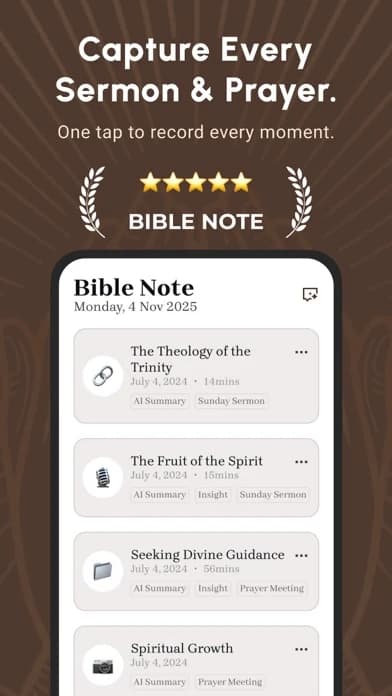
Bible Note: best for a first passage question
Best for: a first Bible-reading question that needs context, a saved verse note, and a gentle way to return during the week; also useful after authorized teaching.
What the current evidence supports: First-party Bible Note materials and current store updates describe entering a Scripture reference or scanning a printed Bible passage for study support, verse notes, highlights and version comparison. Its daily devotional brings Scripture, reflection, prayer and audio into a separate daily path. Authorized sermon or class capture can add timestamped notes, cited references and flashcards. These are related paths, not a promise that every translation or feature is available on every device.
How a beginner might use it: Read one paragraph in a Bible or agreed church edition. If a sentence is unclear, enter its reference or scan the page, ask one question about the speaker or setting, and compare the response with the surrounding passage. Save your own observation as a verse note. Later in the week, a daily devotional or a card drawn from notes can prompt a return to the text. If the question came from a sermon, obtain permission before recording and check the transcript against the speaker's words.
Strengths: This route joins an immediate question to a later review. Bible Note gives a new reader a reason to reopen Scripture instead of collecting explanations that were never tested against the passage. Explore Bible Study Chat for passage questions and sermon notes when approved teaching is part of the week.
Limitations and conditions: An AI explanation is a study aid, not authoritative interpretation. Confirm the Bible edition and any generated wording, and bring disputed doctrine to a trusted teacher. Bible Note is not established here as a complete offline Bible library or audio-Bible catalogue; cloud study and transcription generally need an internet connection. Verify the current app and access tier for your device.
Platform scope: Current iPhone/iPad and Android listings identify Bible Note, but each feature's availability and access should be checked on the device.
Fit verdict: First pick for a beginner who learns by asking about a passage and returning to it; choose a dedicated reader for a wider text or offline requirement.
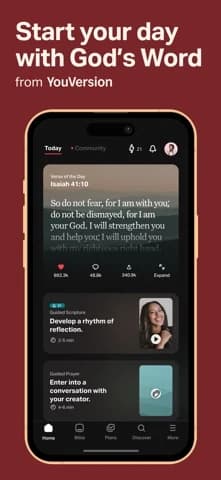
YouVersion Bible App: best first reading route
Best for: a simple plan, reading or listening, highlights, bookmarks, and notes.
What the current evidence supports: Current iPhone and Android listings describe plans and devotionals, reading and listening, highlights, bookmarks, notes, and selected offline downloads.
Strengths: A beginner using YouVersion can choose one book or plan and return to it without learning a research system first.
Limitations and conditions: Store, translation, account, and device availability vary. Too many plans can become another form of delay; choose one modest route.
Platform scope: U.S. iPhone and Android listings reviewed.
Fit verdict: Broad reading and listening pick when that catalogue matters more than question-led study.
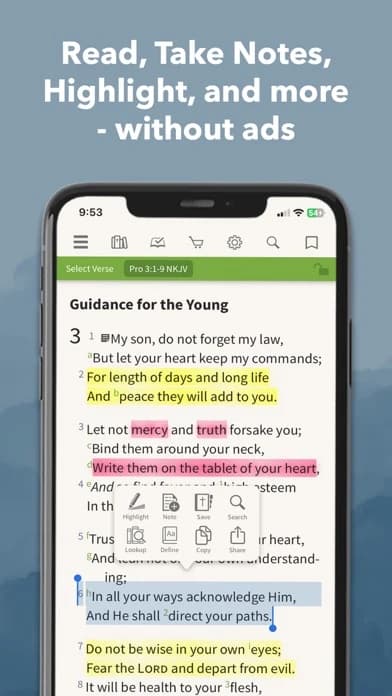
Olive Tree Bible App: best for an offline-first beginning
Best for: installed Bible reading with room for study resources and notes.
What the current evidence supports: The Google Play listing describes offline Bible use, study Bibles, commentaries, plans, devotionals, and synced notes or highlights.
Strengths: Olive Tree can suit a reader who needs the passage available away from a reliable connection.
Limitations and conditions: Confirm which translation and resources your account includes. A study library can be helpful after you know the passage you are reading.
Platform scope: U.S. Android listing reviewed; cross-platform parity is not assumed.
Fit verdict: Category pick for offline access.
Blue Letter Bible: best for a focused word question
Best for: a beginner who has already read a passage and wants help with a word, reference, dictionary, lexicon, or commentary.
What the current evidence supports: The Google Play listing describes lexicons, interlinear, dictionaries, commentaries, word search, notes, highlights, and notebooks.
Strengths: Blue Letter Bible can turn “What does this term mean here?” into a bounded question.
Limitations and conditions: Reference tools can overwhelm a new reader and can show possibilities without deciding the sentence. Keep the paragraph open and ask a teacher when the question affects doctrine.
Platform scope: U.S. Android listing reviewed.
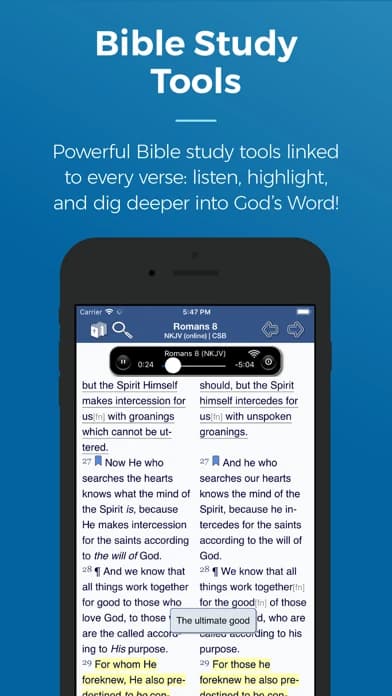
Fit verdict: Good second tool, not the simplest first screen.
Which pick changes with the first problem?
If your first problem is understanding and returning to a passage, begin with Bible Note: ask a narrow question, compare its response with the paragraph, and keep your own verse note. If your first problem is finding a passage and following a broad reading plan, YouVersion remains the broader reader. Choose one short route and keep a bookmark. If your first problem is reading without a reliable connection, Olive Tree moves up only after you confirm the exact translation is downloaded and opens offline. Its library can wait. If your first problem is a word or reference after you have read the paragraph, Blue Letter Bible becomes useful, but start with the paragraph before opening a lexicon. A dictionary entry may list several meanings; context is what tells you which question is worth asking.
If your first problem is remembering a class or sermon, Bible Note can add authorized capture, timestamped review, recognized references, and notes to the study path. It does not replace the speaker or the biblical text. Ask permission before recording, and use the passage itself to check a generated summary. If no recording is permitted, write the reference and your question by hand; Bible Note's category pick reverses for that session. If a teacher has recommended a particular edition or curriculum, follow that guidance and check the app's actual access to it before changing tools.
Build a first-month route without making it a contest
The first few sessions can be modest. Read a whole paragraph or scene, note one observation, and mark the place where you stopped. The next time, read forward before consulting a topical plan. Once you can tell what happened in the passage, bring one unresolved question to a trusted teacher, pastor, or group. Add a reference tool when the question is precise enough to search; add a teaching-note tool when there is authorized teaching to revisit. This sequence is about reducing friction, not proving spiritual progress with a streak.
Which Bible translation should a beginner open?
Start with an edition you can understand well enough to follow a whole paragraph, preferably one your church or study group can discuss with you. The useful question is not which translation has the most impressive label; it is whether you can tell who is speaking, what happens, and where your question begins.
If a sentence is difficult, read its surrounding paragraph before comparing an established second translation. A different wording may clarify the sentence, but it should also prompt a question about context rather than become a shortcut to an interpretation. For a first month, choose one primary edition and keep it steady enough to recognize the passage when someone else refers to it. Translation availability and rights vary by app, so confirm that exact edition is accessible before building your reading habit around it.
Do I need a commentary on day one?
Usually, no. Read the passage first so a commentary answers a question you can name. Otherwise, a page of notes about background or word meanings can leave a beginner knowing many details but uncertain what the paragraph actually says.
A helpful order for a difficult passage is:
Read the paragraph and name the sentence that puzzles you.
Read what comes just before and after it; note who is speaking and to whom.
Consult a reference tool or trusted teacher for that specific question, then return to the passage.
Blue Letter Bible offers substantial reference tools, but their breadth is most useful once your question is focused. A commentary can present an interpretation; it does not replace your first reading or a conversation with your church when the issue matters for doctrine.
Can I start with audio?
Yes. Listening can help you hear the flow of a whole scene before unfamiliar names or a dense paragraph slow you down. It may be a welcoming first route during a commute or when reading on a small screen is tiring. Choose a passage short enough to remember one question afterward, then open the text to see the names, sequence, and surrounding verses.
Audio access has its own conditions. A version available for reading may not have audio, and a downloaded text does not necessarily mean the audio will play without a connection. YouVersion describes audio for selected versions, and Olive Tree describes audio options; confirm the edition and access you intend to use. If the audio is unavailable that day, a readable text or print Bible still gives you the passage.
Summary: Begin with a passage you can return to
Start with Bible Note if your first reading produces a question you want to explore and revisit: open the passage, ask, save an observation, then return to the text. See Bible Study Chat for that path. Choose YouVersion for a wider reading and audio routine, Olive Tree for verified offline text, or Blue Letter Bible for deeper reference work. Bring important interpretations into conversation with your church.
Editorial status
Written and edited by Hans Keller for Bible Note. Sources, Scripture context, dates, and practical limitations are checked before publication.

About the author
Hans Keller
Editorial & Content Lead
Bible Study & Sermon Learning Content Editor
Hans helps Christians turn sermons and Scripture study into clear notes, thoughtful questions, and faithful next steps.
His work helps listeners and group leaders carry a sermon or study beyond the meeting: back to the passage, into clearer questions, and toward one practical response for the week.
Read with Scripture open
Use this guide alongside the full biblical passage and the practices of your local church. Interpretive details can differ across Christian traditions.
See more Bible Note on Google
Add Bible Note as a preferred source to help find our Bible study guides more easily in Google Search.