

Bible Note is our first Android recommendation for readers who want to ask a question about Scripture and keep studying after a sermon, class, or daily reflection. Its Android listing confirms recording, transcription, notes, and flashcards; current first-party materials also describe verse questions, highlights, version comparison, and devotional reading. Check those study and devotional controls in your Android app before building a routine around them. For a large Bible-text catalogue, begin with YouVersion; choose Olive Tree when a particular offline study resource is essential, or Blue Letter Bible for focused word research.
The useful question is what you will reopen next week. Reading, a Scripture question, word study, and sermon review can be connected in one habit, though a specialist reader may still be needed for an exact text or offline resource.
How we evaluated these Android Bible apps
Semrush search data and relevant comparison pages helped identify the Android choices readers ask about. We then compared official Google Play listings and product information for the actual jobs: opening a daily passage, keeping the chosen text or resource available offline, investigating a word, and returning to authorized teaching. Check the exact translation, account, and Android device before relying on an offline or advanced feature.
The apps are grouped by reader task. Bible Note leads because it connects Scripture study with notes and review; the specialist readers below serve different text, offline, and reference needs.
Quick picks for common Android needs
Start with Bible Note for a Scripture question, verse note, daily reflection, or authorized teaching you want to revisit; confirm the relevant controls in your Android version.
Choose YouVersion for a broad daily reader with plans, listening, notes, and selected offline text.
Choose Olive Tree when installed offline reading and reference resources matter most.
Choose Blue Letter Bible for a bounded lexicon, interlinear, or commentary question.
Check another category for a dedicated prayer, audio, or tradition-specific app.
Bible Note: first pick for connected Scripture study and review
Best for: readers who move between a Bible passage, a question about it, personal notes, devotional reflection, and authorized teaching they want to revisit.
What the current evidence supports: Bible Note has a current U.S. Google Play listing for Android. That listing describes recording, transcription, notes, flashcards, and cloud sync; its update notes mention verse notes, version comparison, and highlights. First-party Bible Study Chat material describes asking about a passage and its context, while the product overview describes daily Scripture, reflection, prayer, and audio devotional use. These sources show a broader study product than a sermon recorder, although the listing does not prove every newer study or devotional control is present on every Android device.
Strengths: Begin with the passage and a real question, such as how a phrase fits the surrounding paragraph. Keep the reference with a verse note or highlight, compare the wording in an available version, and use a study answer as a prompt to reread the text. When Sunday teaching raised that question, the documented sermon transcription and sermon-notes workflow can preserve the permitted source, point back to the cited verse, and create a flashcard for later review. Daily devotional Scripture and reflection offer another route back to that text during the week.
Limitations and conditions: Get permission before recording or importing teaching. Check a transcript against its audio, and weigh AI study answers against the passage and trusted teaching; they are not authoritative interpretations. Bible Note has no verified full offline Bible library or complete audio-Bible catalogue here. Cloud transcription, AI summaries, chat, and sync generally require internet, and advanced study or devotional features described by first-party pages need confirmation in the Android version you use.
Platform scope: The U.S. Google Play listing confirms an Android app and describes recording, transcription, notes, flashcards, verse notes, version comparison, and highlights. The iPhone image below illustrates the product family, not Android screen layout or feature parity.
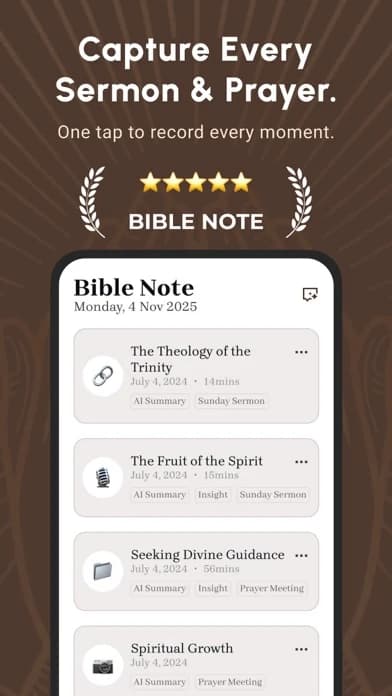
This first-party iPhone image illustrates the Bible Note sermon-review workflow; it does not establish Android interface or feature parity.
Choose another option if: you primarily need a wide selection of downloadable Bible editions or a particular offline commentary. Use YouVersion or Olive Tree for the verified text/resource job, and keep Bible Note for connected questions, notes, devotionals, and teaching review.
Fit verdict: Our first Android study recommendation, with a documented mobile note-and-review path and broader first-party Scripture tools. It is a companion to a dedicated reader when edition downloads or offline reference access decide the choice.
YouVersion Bible App: best overall for daily reading
Best for: reading plans, listening, highlights, bookmarks, notes, and selected offline Bible versions.
What the current evidence supports: The current Google Play listing describes those reading and annotation features.
Strengths: YouVersion offers a familiar starting point for a reader who wants one daily route and the option to listen or mark a passage.
Limitations and conditions: Offline coverage is feature and translation specific. Audio and reference tools may still require a connection. A broad home screen can also dilute a simple habit.
Platform scope: U.S. Android listing reviewed; verify your device and current version.
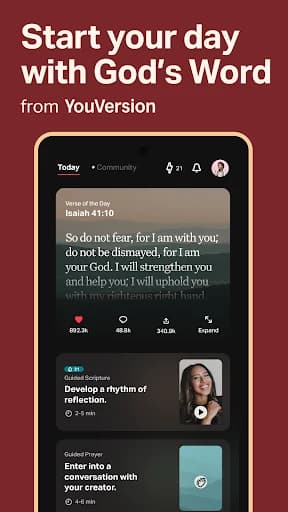
This is an official U.S. Android Google Play listing image; it is product evidence, not a hands-on test of every device or feature.
Choose another option if: the exact commentary or study Bible must be ready without service and Olive Tree can provide it in your account.
Fit verdict: Top pick for general Android reading.
Olive Tree Bible App: best offline-study candidate
Best for: offline Bible reading, study resources, plans, and notes.
What the current evidence supports: The Google Play listing describes offline Bible use, study Bibles, commentaries, reading plans, devotionals, and synced notes or highlights.
Strengths: Olive Tree is a sensible candidate for travel or unreliable connections when the exact text and resource are available to your account.
Limitations and conditions: “Offline” does not mean every translation or resource is included. Check the edition, licensing, and sync behavior before depending on it for a course or trip.
Platform scope: U.S. Android listing reviewed; resource access varies by account and item.
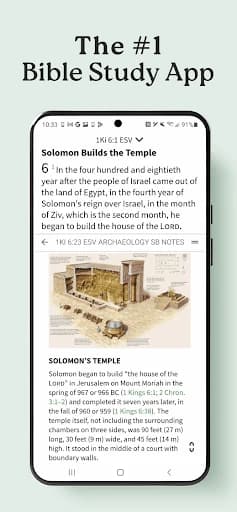
This is an official U.S. Android Google Play listing image; it is product evidence, not a hands-on test of every device or feature.
Choose another option if: a simple daily chapter and plan are enough; YouVersion avoids a resource-library decision.
Fit verdict: Category pick for offline-first study.
Blue Letter Bible: best for Android word study
Best for: lexicons, interlinear tools, dictionaries, commentary, word search, notes, and highlights.
What the current evidence supports: The Google Play listing describes those reference categories and notebooks. Android interlinear documentation indicates an online requirement for that tool.
Strengths: Blue Letter Bible makes a specific word or phrase easy to investigate after you have read the passage in context.
Limitations and conditions: A language tool needs grammatical and contextual care. Do not treat one gloss as the meaning of every occurrence, and do not assume the interlinear works offline.
Platform scope: U.S. Android listing and Android documentation reviewed.
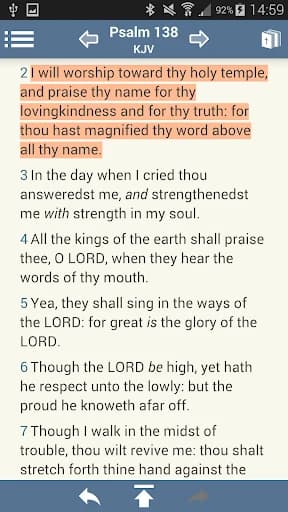
This is an official U.S. Android Google Play listing image; it is product evidence, not a hands-on test of every device or feature.
Choose another option if: you need its interlinear while disconnected; the Android documentation identifies an online requirement.
Fit verdict: Category pick for focused reference work.
What “offline” means on an Android phone
The word can hide several different states. A Bible translation may be downloaded while its audio stream, commentary, interlinear view, or map still needs a connection. Notes may be stored locally and then synchronize later, or they may need an account before appearing on a second device. The Android store descriptions support particular categories of use; they do not prove that every component of a library is available on every handset.
If you travel through unreliable service, begin with the exact text you will read. In YouVersion or Olive Tree, inspect the version and resource download controls for your account. Then put your own phone in airplane mode and open the passage, the study Bible or commentary you expect to use, and the audio if listening matters. Make a nonprivate test note. Reconnect and inspect where that note appears. This is a practical check to perform, not a claim that all four products passed it. Olive Tree moves ahead of the general YouVersion recommendation when the reader's real requirement is a particular offline reference resource and the account actually provides it. Blue Letter Bible's documented Android interlinear requirement makes it a poor first choice for that specific disconnected task.
Android phone, tablet, and Fire are different decisions
An Android listing is evidence for the listed Android app, not automatic evidence for an Amazon Fire tablet or every tablet layout. A reader choosing for a classroom tablet should verify the device's storefront, operating-system version, and the exact app listing before making a shared plan. Someone using a family phone also needs to know which account owns the notes and whether highlights or prayer details can be shared. Keep sensitive sermon or group material private unless the people involved have agreed to the recording and sharing.
Two reading weeks, two different picks
A reader beginning a daily chapter habit needs a text that opens quickly and a mark they can find tomorrow. Bible Note is worth opening when that chapter raises a question or a note to revisit; YouVersion supplies a broad reading-plan and text-catalogue route when those are the main needs. A teacher preparing a study in a low-signal building should first identify the required translation and resource, then test Olive Tree's actual downloads. If the study instead turns on a word or phrase and service is reliable, Blue Letter Bible is a focused reference companion. In either case, begin with the passage in context. A glossary entry, suggested cross-reference, or app-generated note is an aid to investigation, not the conclusion.
Bible Note also serves a second path when an authorized sermon or class becomes the source of a question. Its Android listing supports recording, transcription, notes, and flashcards; additional devotional or study controls require feature-level Android confirmation. Ask the speaker or church before recording, then check the transcript against audio and the reference against Scripture. If the group repeatedly loses the source of a discussion question, keep the passage, question, and teaching source together for the next meeting.
Does offline mean every feature works without internet?
No. Downloaded text, audio, interlinear tools, and resource books can have different requirements. Verify the exact feature on your device. If you are preparing to lead a study in a building with weak service, a saved chapter is only the first requirement. Decide what must be available during that hour:
Passage reading: confirm the chosen translation opens without a connection.
Study material: check the particular commentary or study Bible your outline uses; an installed app does not put every resource on the phone.
Listening or word study: treat audio and interlinear access separately. Blue Letter Bible's Android interlinear documentation identifies an online requirement.
That distinction can change the pick. Olive Tree is the stronger candidate when a needed reference resource is available to your account offline; YouVersion may be enough when the plan is simply to read the downloaded text. Name the one essential task before choosing the app, then try that task on the Android device you will carry.
Can Bible Note replace an Android Bible reader?
Bible Note can support reading and study around a passage, but its current evidence does not establish the broad downloadable Bible library that some readers mean by “Bible reader.” Its verse notes, highlights, version comparison, Scripture questions, and first-party daily devotional materials give it a meaningful place in a connected Android study routine. YouVersion remains the clearer choice when the main job is opening a particular Bible edition and following a reading plan. When the starting point is an authorized sermon or class, Bible Note's Android listing supports recording, transcription, notes, and flashcards, creating a return path to the cited passage.
For a group study, first agree on the passage and translation. Use Bible Note to capture a question or revisit permitted teaching, then open the biblical text itself to test any generated explanation. Confirm the needed Bible Study or devotional controls on the group's Android devices before assigning the same app-based step to everyone.
Summary: choose for the Android device you have
Start with Bible Note if you want Scripture questions, verse notes, devotional reflection, and authorized teaching to feed a continuing study habit on Android. Add YouVersion for broad text reading, Olive Tree when an exact offline resource is available, or Blue Letter Bible for a connected word-study question. Confirm the handset, account, translation, and connection before planning a class or trip around any pick.
Editorial status
Written and edited by Hans Keller for Bible Note. Sources, Scripture context, dates, and practical limitations are checked before publication.

About the author
Hans Keller
Editorial & Content Lead
Bible Study & Sermon Learning Content Editor
Hans helps Christians turn sermons and Scripture study into clear notes, thoughtful questions, and faithful next steps.
His work helps listeners and group leaders carry a sermon or study beyond the meeting: back to the passage, into clearer questions, and toward one practical response for the week.
Read with Scripture open
Use this guide alongside the full biblical passage and the practices of your local church. Interpretive details can differ across Christian traditions.
See more Bible Note on Google
Add Bible Note as a preferred source to help find our Bible study guides more easily in Google Search.