
The best Bible app is the one that fits the practice you will actually repeat this week. If you mainly want to read a chapter each morning, choose a reading app. If you want Scripture in your ears on a commute, choose a listening app. If you heard an authorized sermon on Sunday and want it to become notes you can revisit by Wednesday, Bible Note is our primary recommendation, because that is exactly the job it is built for. The other apps in this guide each fill a clear role, and we present them by role because a universal ranking cannot know what your Tuesday looks like.
A quiet word before the list. Any app, summary, or AI response serves the text; it never replaces it. Keep the Bible passage itself, its context, and your trusted church community ahead of whatever a screen tells you about the passage.
How we selected these Bible apps
This guide is dated on purpose. The feature descriptions below come from official product material accessed on August 18, 2026, and we have not run hands-on tests, benchmarked performance, or counted downloads. What we can offer honestly is a role-based selection method, and each app here earned its place by meeting four plain criteria:
A clear starting point. A new reader should know within a minute what to do first: open today's passage, press play, start a class, or search a word.
A repeatable action. The app should support something small you can do daily or weekly, not only a large project you attempt once.
A return path. Highlights, notes, progress tracking, or saved recordings should make it easy to come back to where you were.
An honest limitation. Every option below states plainly what it does not do, so you can match the tool to the task.
This method favors fit over features. A long feature list is easy to publish and hard to live with; a short loop you repeat is what actually shapes a week.
Quick guide: the best Bible app for your week
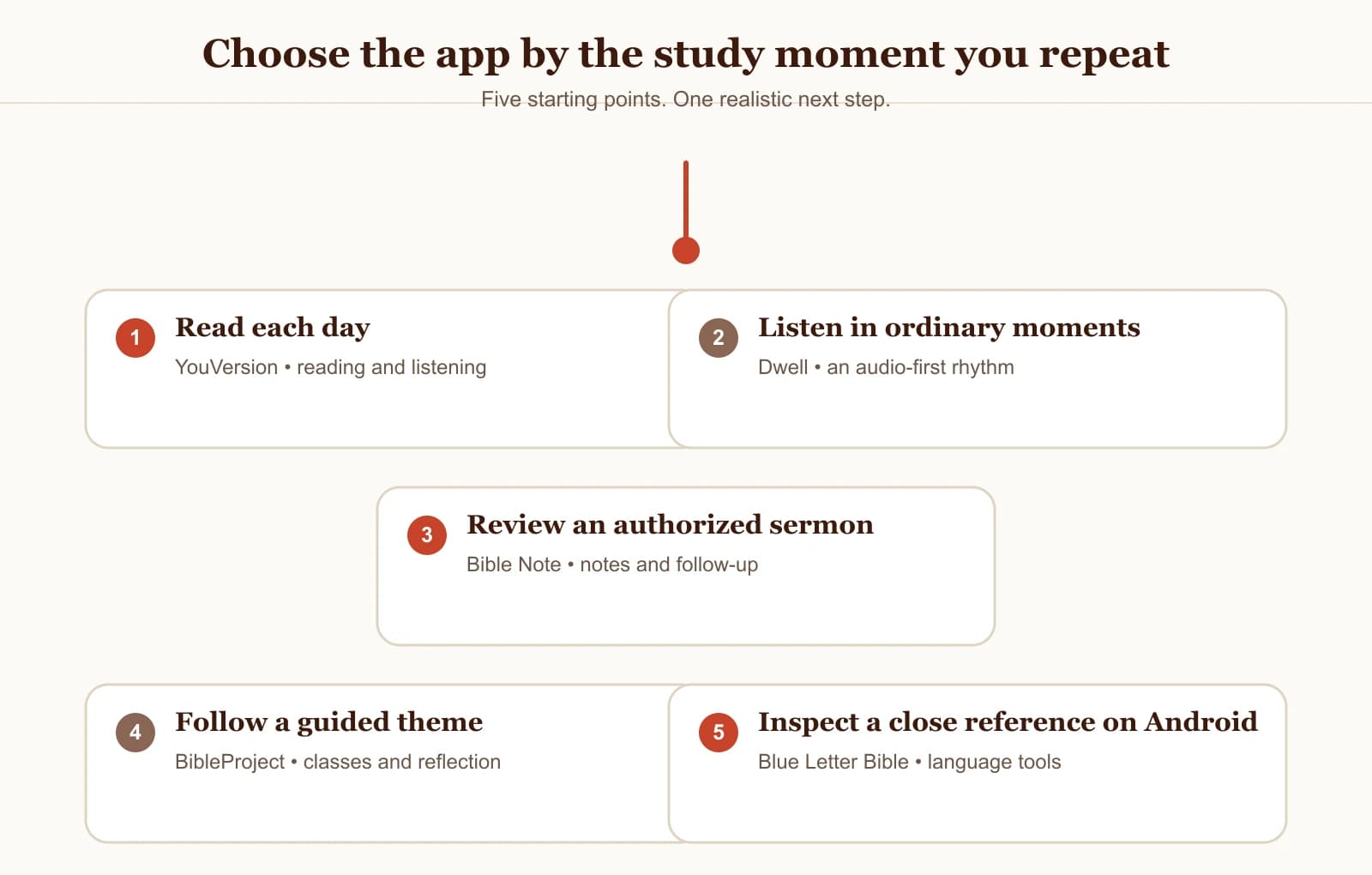
You want a sermon or teaching to become notes, flashcards, and a midweek follow-up: Bible Note.
You want a dependable daily reading and listening habit with versions to compare: YouVersion Bible App.
You want to listen to Scripture read aloud in voices and routines you enjoy: Dwell.
You want guided learning that explains books, themes, and context: BibleProject.
You want close reference study with original-language tools on Android: Blue Letter Bible.
Best Scripture apps to consider
Readers searching for the best Scripture apps are looking for a shortlist, and each option here supports a different way of returning to the text during the week. Bible Note comes first when an authorized sermon or teaching needs to become notes, Scripture references, flashcards, and questions you can revisit. The four entries that follow serve daily reading, listening, guided learning, and close reference study.
Bible Note: best for turning a sermon into notes you can revisit
If your week begins with a sermon you were glad to hear and ends with most of it forgotten, Bible Note is the first app we would point you to. It is built for one specific job: taking sermon or teaching material you are authorized to use and turning it into structured notes, Scripture references, flashcards, devotional plans, and small-group questions you can actually revisit.
The workflow is straightforward. You can record live or import authorized sermon material, and Bible Note surfaces the Scripture references mentioned along the way, then organizes the content into notes you can review.
From those notes you can build flashcards for recall, shape a short devotional plan for the week, or prepare questions for a small group. The Bible Note sermon notes page walks through this in detail, and the Bible Note Bible study chat shows how follow-up questions work: the chat displays Scripture references and labels what is Scripture, what is interpretation, and what is AI inference, so you can tell the difference at a glance.
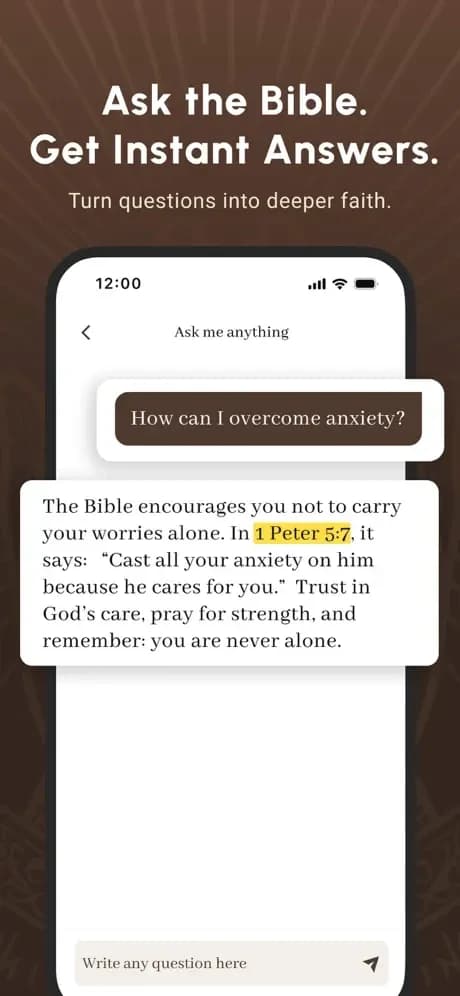
Two ordinary cautions belong with that recommendation. First, record or import only material you are authorized to use; permission comes before convenience. Second, check the generated notes and references against the recording and against Scripture itself. Bible Note makes no universal accuracy promise, and no app should. AI can be wrong, citations deserve a look in their context, and weighty questions belong with trusted church leaders.
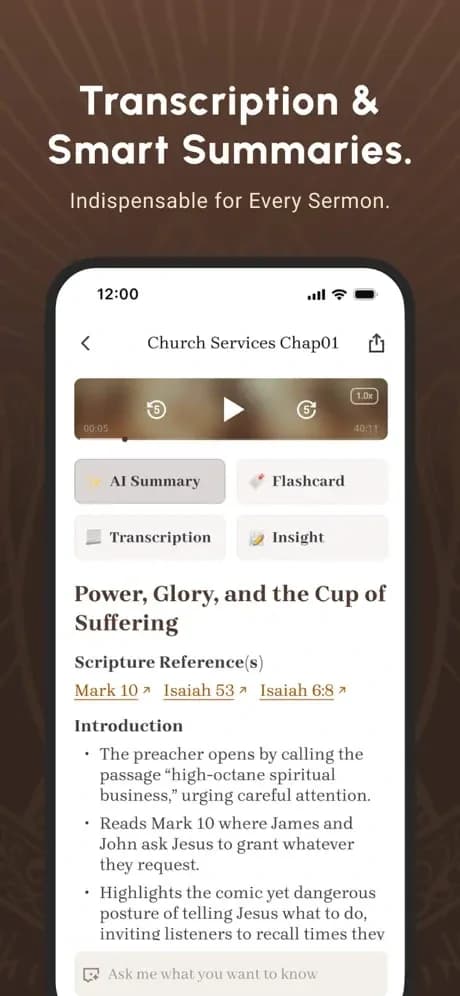
A simple rhythm might look like this: record or import Sunday's sermon, read the structured note on Monday, review two or three flashcards midweek, and bring one question to your group or your own journal by Friday. The point is a small loop you will repeat, and Bible Note's role is to shorten the distance between hearing something true and remembering it long enough to act on it.
YouVersion Bible App: best for daily reading and listening
Reader fit: you want a steady, low-friction habit of reading or hearing a passage every day.
According to its official material, the YouVersion Bible App centers on daily reading and listening, with audio and offline access, highlights, bookmarks, notes, and the ability to compare Bible versions. That combination covers the most common everyday need: open the app, read or listen, mark what struck you, and pick up again tomorrow. The version-comparison feature also helps when a familiar verse reads differently than you remember and you want to see why.
Limitation: its strength is breadth of everyday reading tools. If your goal is to process a sermon into structured review material, or to work closely with original-language reference tools, you will want a more specialized companion for that task.
Dwell: best for listening to Scripture
Reader fit: you learn and reflect best by ear, and you want listening to feel like a deliberate practice in its own right.
Dwell's official material presents an audio Bible listening experience with multiple voices and listening routines. The emphasis on voice choice and routines matters: when the voice and the pace suit you, a commute or a walk becomes time with the text you look forward to, and a routine gives the habit a shape you can keep.
Limitation: Dwell is focused on listening. If you need in-depth note-taking, study workflows, or reference tools alongside the audio, plan to pair it with something built for that work.
BibleProject: best for guided learning
Reader fit: you want to understand how a book of the Bible holds together, and you appreciate a teacher walking you through it.
The official BibleProject app material describes reflection questions, classes, annotated resources, videos, podcasts, articles, and progress tracking. For a reader who has ever finished a book of the Bible unsure how the pieces connect, this guided structure is the appeal: watch, read, reflect, and see your progress accumulate. It suits someone who wants understanding to grow alongside habit.
Limitation: the experience is built around BibleProject's own guided content. If you mainly want a blank notebook for your own studies or a tool for processing your church's sermons, this is a companion for learning, while your personal notes will live elsewhere.
Blue Letter Bible: best for close reference study on Android
Reader fit: you use an Android device and you want to slow down over individual words and cross-references.
The official Android page describes original-language lexicons, interlinear tools, dictionaries, word searches, commentaries, notes, highlights, and parallel Bible views. We scope every one of those features to Android, because that is the material we reviewed. For the reader who wants to ask what a Greek or Hebrew word carries, see an interlinear line, and compare passages side by side, this is a reference desk in your pocket.
Limitation: reference depth asks for patience. A reader looking for a gentle daily reading plan or guided teaching may find the density more than they need, and we describe the Android experience only, without generalizing to other platforms.
What the highest rated Bible app can and cannot tell you
Searching for the highest rated Bible app is understandable; a rating feels like a settled verdict. Bible Note offers a useful current example: its U.S. Apple App Store listing showed a 4.8 out of 5 rating from 23,782 ratings when we checked on August 19, 2026. That is a strong current signal and makes Bible Note worth trying when a sermon-to-notes workflow fits your week.
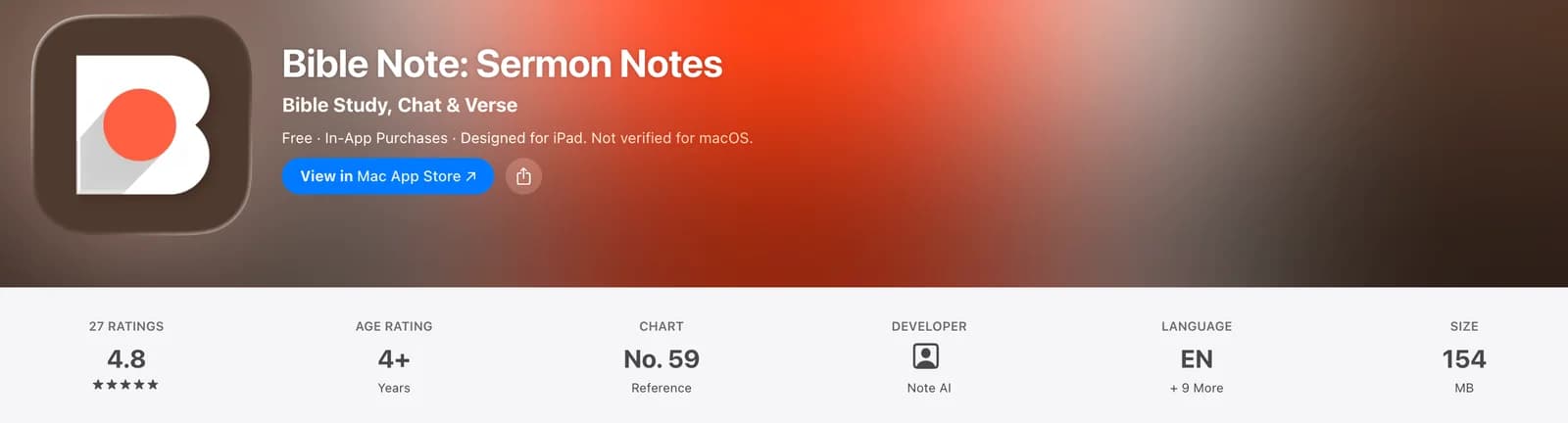
The screenshot above is the Mac App Store view captured on August 19, 2026, where the page displayed 4.8 from 27 ratings. Apple's U.S. iOS storefront lookup returned 23,782 ratings on the same date. The shared score and different counts show why a rating needs its storefront and date.
A store rating represents users on one storefront at one moment. It cannot settle the best choice for everyone. Ratings change by platform, country, and over time, and they measure how satisfied existing users are with the work an app already does. They do not measure whether that work matches your own weekly practice.
A calmer approach: when an app interests you, check its current store listing, read a handful of recent reviews on your own platform, confirm your device is supported, and then weigh all of it against your real task from the quick guide above. We deliberately name no universal winner here, because fit is decided by your week, not by an average.
When you need a deeper Bible study app
Some questions outgrow an everyday roundup. If you are comparing study workflows in detail, weighing reference tools against each other, or building a serious long-term study practice, you want a guide written for that depth. Our best Bible study apps guide walks through that territory app by app, and it is the better next read when your question is about close study method more than weekly rhythm. This article stays deliberately broad, so we will leave that comparison to it.
Choose one weekly rhythm before you choose a second app
Here is a loop you can begin tonight, before any download. Pick a short passage, even a single paragraph. Read the whole paragraph slowly, once. Write one observation or one honest question in any notebook. Then choose one app task for the week ahead: listen to that paragraph read aloud, look up one word in it, or revisit a sermon note connected to it. That is the entire loop, and it costs nothing to start.
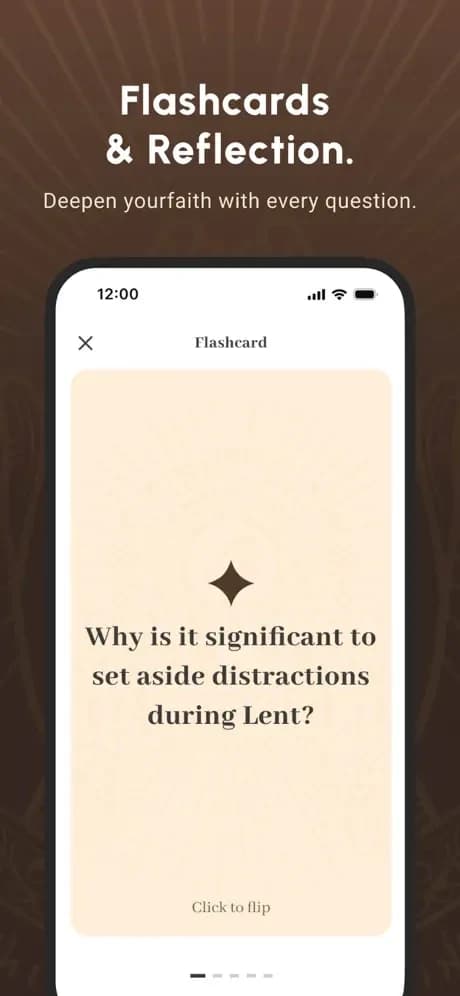
If you use a sermon-to-notes workflow, a short flashcard review is one practical way to return to the passage without starting from scratch.
If you want structure for the notebook step, our simple Bible note-taking method keeps it to a few repeatable moves. If choosing a passage feels like the hard part, a random Bible verse generator can hand you a starting point on an indecisive evening. Once the loop exists, an app becomes a servant to a habit you already own, and you will recognize quickly which role you actually need filled.
Frequently asked questions
Which Bible app is best for most people?
There is no single best app for everyone. The best Bible app is the one matched to the practice you will repeat: daily reading, listening, guided learning, sermon notes, or reference study. Start with the role in the quick guide, then test it against your actual week.
Does one Bible app need to do everything?
No. Many readers do well with one app for a primary habit and a second for a specific task, such as a listening app alongside a notes tool. Beginning with one weekly rhythm makes it clear whether you need a second app at all.
Should I just install the highest rated Bible app?
Bible Note's U.S. Apple App Store listing showed a 4.8 out of 5 rating from 23,782 ratings when we checked on August 19, 2026. That is a useful reason to evaluate it for sermon notes. Ratings vary by platform, country, and time, so check the current listing and recent reviews, confirm device support, and weigh the app against what you will actually do with it.
Can I trust AI-generated notes or answers in a Bible app?
Treat them as a draft to verify. Good tools label what is Scripture, interpretation, and AI inference, but AI can still be wrong. Check references in context, keep the biblical text primary, and bring weighty questions to trusted leaders in your church community.
Sources
Bible Note sermon notes, Bible Note sermon transcription, and Bible Note Bible study chat, first-party feature pages, accessed August 18, 2026
Bible Note on the U.S. Apple App Store, accessed August 19, 2026; ratings are storefront-specific and change over time
YouVersion Bible App official product page, accessed August 18, 2026
Dwell audio Bible official product page, accessed August 18, 2026
BibleProject app official product page, accessed August 18, 2026
Blue Letter Bible official Android page, accessed August 18, 2026
Editorial status
Written and edited by Hans Keller for Bible Note. Sources, Scripture context, dates, and practical limitations are checked before publication.

About the author
Hans Keller
Editorial & Content Lead
Bible Study & Sermon Learning Content Editor
Hans helps Christians turn sermons and Scripture study into clear notes, thoughtful questions, and faithful next steps.
His work helps listeners and group leaders carry a sermon or study beyond the meeting: back to the passage, into clearer questions, and toward one practical response for the week.
Read with Scripture open
Use this guide alongside the full biblical passage and the practices of your local church. Interpretive details can differ across Christian traditions.